
A construction quotation spreadsheet needs to do more than produce a presentable total. It needs to help the commercial team build a clear scope, use controlled cost inputs, identify assumptions and issue the right revision to the client.
For many UK construction businesses, Excel remains useful for estimating and testing commercial options. The risk grows when a working quote becomes a repeatable operational record that several people amend, review and issue. Copied rates, unclear exclusions, late drawing changes and multiple file versions can all affect the final commercial position.
This guide focuses on building and controlling a client-ready construction quotation spreadsheet. It does not cover quotation approval authority, discount thresholds or escalation workflows.
What a client-ready construction quotation spreadsheet should contain
Start with a structure that separates quote inputs, internal cost build-up and client presentation. These areas can sit in separate tabs or clearly defined sections, depending on the complexity of the workbook.
A practical quotation workbook commonly includes:
- Quote header: quotation reference, revision, issue date, client, site address, contact and project description.
- Scope and line items: work packages, descriptions, units, quantities and commercial inclusions.
- Cost build-up: labour, materials, plant, subcontract allowances and other delivery costs needed for internal review.
- Rate source: a maintained source for the rates and allowances used in the quote.
- Assumptions and exclusions: conditions, dependencies and items that are not included in the price.
- Client quotation: a clean issue-ready view of the offered scope, totals and relevant commercial wording.
- Revision record: the current revision, the reason for change and references to relevant drawings or specifications.
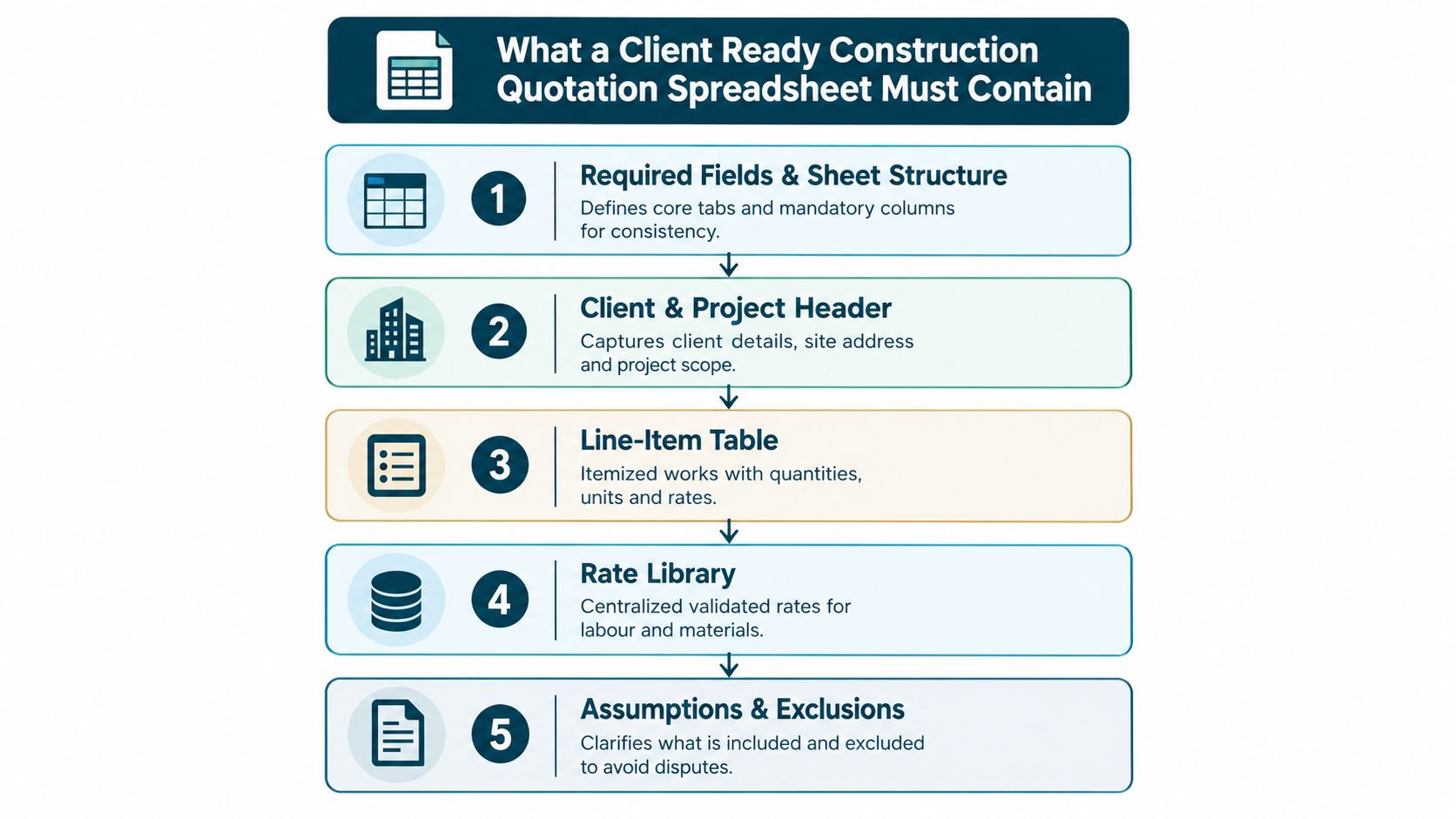
The quotation reference and revision should appear on both the working record and the issued client document. Where drawings or specifications affect the price, record the relevant revision alongside the quote rather than leaving that detail only in an email chain.
Separate internal cost control from client presentation
An estimator may need detailed cost information to review the offer. A client normally needs a concise description of the work, the price and the applicable scope wording. Keeping these purposes separate can make the workbook easier to review and less likely to expose internal commercial logic unintentionally.
Internal line-item records may include fields such as:
| Field | Why it matters |
|---|---|
| Work package | Groups related work for review and presentation |
| Description | Defines the priced scope |
| Quantity and unit | Records the basis of the estimate |
| Cost category | Distinguishes labour, materials, plant and subcontract costs |
| Rate source | Shows where the cost input came from |
| Allowance or note | Records relevant estimating context |
| Internal cost total | Supports commercial review |
| Client-facing value | Feeds the issued quotation where appropriate |
Use a controlled rate source rather than repeatedly typing values into individual quotes where that suits the estimating process. A rate record can include a description, unit, source, effective date and status. If a rate is unavailable or no longer suitable for use, make that visible for review instead of allowing it to blend into the estimate unnoticed.
A single amount column may be adequate for a simple fixed-price item, but more detailed work often benefits from retaining the quantity, unit and relevant cost basis separately. The right level of detail depends on how the business estimates, reviews and delivers the work.
Capture forgotten extras before the quote is issued
Missed costs are often not part of the main measured scope. They may arise from site access, deliveries, protection, waste, temporary works, testing, permits, commissioning, design coordination or making good.
Create an assumptions and exclusions register as part of every quote. For each item, make its status clear:
- included in the price
- allowed for but subject to confirmation
- excluded from the offer
- client or third-party responsibility
- requiring further information
Practical rule: When an item could affect delivery cost or scope, record it in the price, allowance, assumption or exclusions register rather than relying on memory.
Important scope wording should appear in the issued quotation, not only in comments, colour coding or hidden tabs. Use UK terminology consistently and clearly distinguish the net amount, VAT treatment and total where applicable to the quote.
Build controls into the spreadsheet workflow
A reliable workbook does not need to become a formula tutorial to be controlled. The priority is to make intended inputs clear, protect calculation areas and provide visible checks for incomplete records.
Useful controls include:
- Table-based line items: Keep quote rows in a consistent table so new scope items are incorporated into the normal review process.
- Controlled input lists: Limit units, cost categories, quote status and revision fields to agreed values.
- Protected calculation areas: Lock areas that users should not edit as part of routine estimating.
- Rate status checks: Highlight missing, inactive or unmatched rate records for review.
- Quantity and scope checks: Prompt the estimator to confirm unusual quantities, missing descriptions or incomplete cost categories.
- Visible assumptions register: Make allowances and exclusions part of the standard quote review.
- Independent review: Have another appropriate person review significant quotations or material revisions before issue.
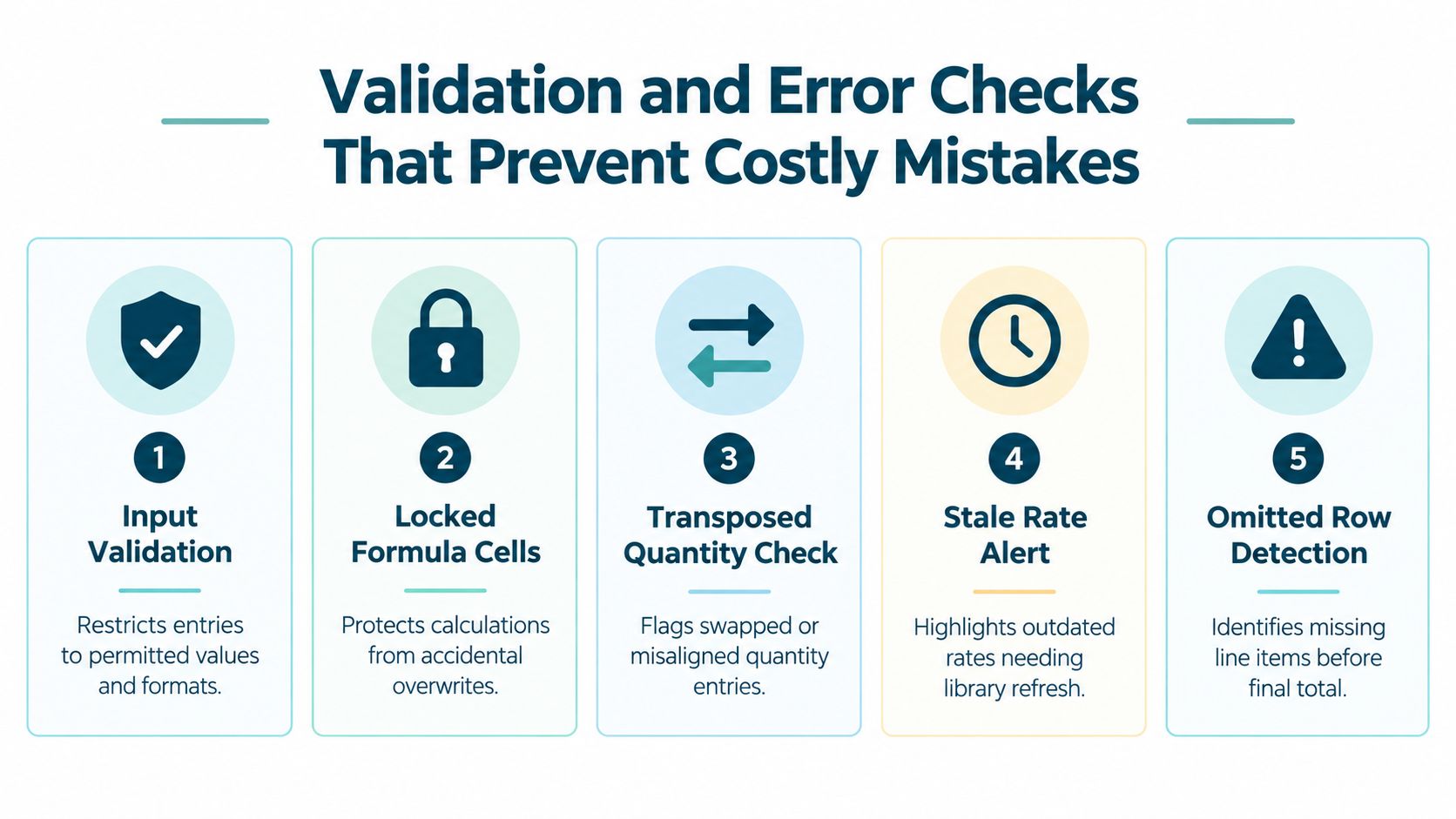
A checks panel is generally clearer than relying on colour alone. For example, it can identify items such as:
- a priced line with no recorded rate source
- a quantity with no unit
- a scope item with no included or excluded status
- a quote based on an earlier drawing reference
- an allowance that has not been reflected in the client-facing scope
These controls do not eliminate the need for commercial judgement. They make it easier to identify what needs that judgement before the quotation becomes a client commitment.
Control revisions and issued PDFs
A quotation should be treated as a controlled business record, not simply as a spreadsheet in a shared folder. The team should be able to identify the current revision, understand what changed and retrieve the exact document sent to the client.
For each revision, record:
- quotation reference
- revision number
- date of issue
- change summary
- relevant drawing and specification references
- rate-source reference where relevant
- current issue status
- the issued PDF or other client document
When a drawing change affects scope or quantities, create a new revision rather than overwriting the earlier issued version. Link the new quote to the previous one and state what changed. This provides useful context if the client later asks why a value, scope item or exclusion differs from an earlier issue.
The issued PDF should be generated from the reviewed quotation record wherever possible. Rebuilding the document manually in another file can introduce another opportunity for the total, revision or scope wording to diverge from the reviewed estimate.
Common spreadsheet pitfalls in construction quoting
Hard-coded cost inputs
Values entered directly into multiple quote lines can be difficult to trace later. Where practical, use a maintained rate source and record the origin of exceptions, supplier allowances or project-specific adjustments.
Hidden assumptions
Comments, cell colours and personal notes are not dependable scope records. Move commercial assumptions and exclusions into a visible register that is reviewed with the quote.
Incomplete scope coverage
New lines added during a revision need the same review as the original estimate. A line-item structure, a scope checklist and an explicit inclusion status can help reveal omissions before issue.
Unclear file versions
Names such as final, final2 and latest do not establish which quotation was issued. Use a quotation reference, revision field and issued-document record instead.
One-person workbook knowledge
If only the original author can safely edit or check a workbook, the process carries operational risk. Document the purpose of key sections, limit routine editing to intended fields and make review steps clear for another member of the team.
| Risk area | Practical spreadsheet control |
|---|---|
| Missed extra | Assumptions and exclusions register |
| Inconsistent cost input | Controlled rate source and visible exceptions |
| Scope revision | Revision field, change summary and source references |
| Accidental calculation edit | Protected calculation areas and independent review |
| Incorrect client document | Generate the issued document from the reviewed record |
When Excel is still suitable
Excel can remain a sensible tool where the quotation logic is understood, the number of editors is manageable and the team can maintain a disciplined process around rates, revisions and issue records.
It is also well suited to modelling options, forecasting, flexible calculations and exploratory estimating work. A small workbook, a small company or a single user does not automatically mean the process needs replacing.
The question is whether the workbook remains practical to control as a live business workflow.
When a managed quotation application may fit better
A spreadsheet may begin to strain when the team needs a shared live rate source, repeated variations, multiple handoffs, guided data entry, role-based access, searchable quote history or consistent generation of client documents.
At that point, the need may be less about a more elaborate template and more about a controlled operational workflow. A fully managed custom web application can turn the established quote process into task-specific screens, validations, records and document outputs, while avoiding the need for the business to run an internal software development project.
For a quotations-specific replacement path, see replacing Excel for quotations. For current commercial information, visit the Spreadsheet Upgrade pricing page.
If your quotation workbook is becoming difficult to control across revisions, rates and issued documents, Spreadsheet Upgrade can help assess whether targeted workbook controls or a fully managed custom web application is the more suitable next step.