
An Excel audit trail is not simply a list of workbook edits or a recoverable copy of an earlier file. For a controlled finance or compliance record, the central question is whether a reviewer can establish who changed a specific record, what changed, when it changed and why.
That distinction matters when a workbook holds operational records such as journals, supplier details, accruals, compliance registers or controlled transaction data. A file may show signs of activity while still leaving the team to reconstruct the history of one amended record from several places.
This guide focuses on record-level evidence for amended operational records. It does not cover file recovery, workbook permissions or general approval-workflow design.
What an Excel Audit Trail Needs to Show
A useful audit trail links evidence directly to the record that changed. For an amendment, a reviewer will commonly need to establish:
- Who made the change, using an identifiable user rather than a shared account.
- When the change was made, using a timestamp that supports the sequence of events.
- What changed, including the previous and replacement values where relevant.
- Why it changed, using a recorded business reason or reference to supporting evidence.
For example, if a supplier record is amended after new documentation arrives, the useful evidence is not only that the workbook changed. It is an event showing the supplier record, the field amended, the earlier value, the new value, the person responsible, the time of the change and the reason for it.
Practical rule: If a reviewer has to compare workbook copies, search emails and ask staff what happened, the organisation is reconstructing history rather than reading a record-level audit trail.
What Excel Change History Can and Cannot Provide
Excel and Microsoft 365 tools can help users understand recent collaboration activity. Microsoft’s Show Changes feature can surface edits in supported shared workbooks, including information about the editor, location and time of an edit. Microsoft’s Show Changes guidance explains its intended use.
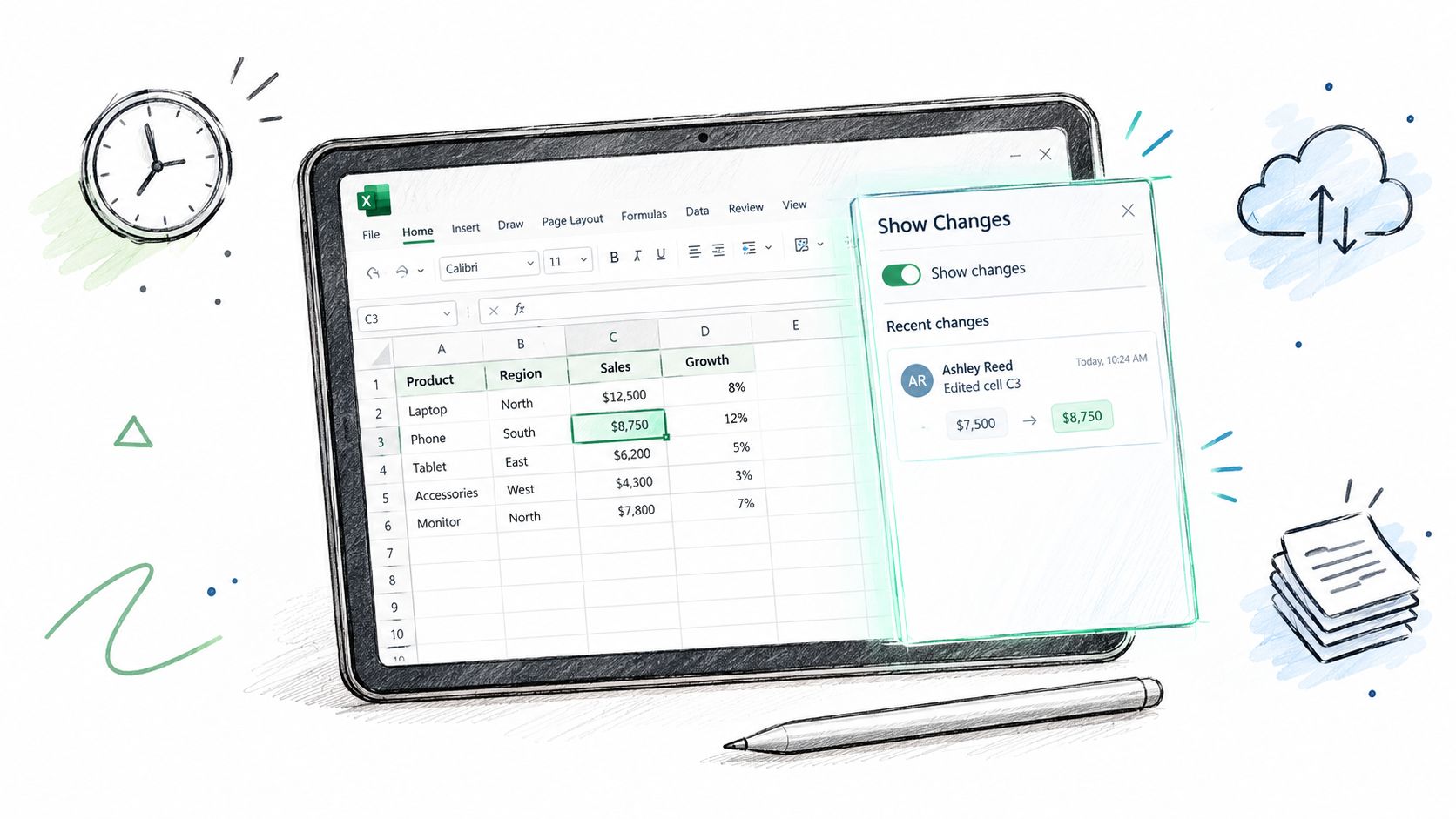
That visibility can be helpful, but it is different from a structured audit-event record. A workbook history may not provide every field needed for a controlled amendment as one durable, queryable event linked to the underlying business record.
The gap is especially clear where staff rely on several separate sources of evidence:
- a recent-change view to identify an edit;
- an earlier workbook copy to infer the previous value;
- a comment, email or paper document to explain the reason;
- a manual log sheet to identify the relevant transaction.
Those sources may be useful operationally, but they require manual joining. The completeness of the evidence then depends on users following the process consistently and preserving each supporting item.
Record-Level Audit Evidence Versus Workbook Activity
| Evidence needed for an amendment | Workbook activity or history | Record-level audit event |
|---|---|---|
| Identifiable user | May show the editor associated with an activity | Links the user directly to the amended record |
| Timestamp | May show when activity or a save occurred | Records the time of the specific amendment |
| Previous value | May require comparison with another workbook state | Stores the prior value with the event where required |
| New value | May be visible in the current workbook | Stores the resulting value with the event |
| Reason for change | Often sits in a separate note, email or log | Captures a reason or reference as part of the amendment process |
| Searchable history | May require reviewing sheets and files | Can be designed for record-based search and reporting |
A file-level history can answer a different question: “What did this workbook look like at an earlier point?” A record-level audit trail answers: “What happened to this supplier record, journal or controlled field?”
Both can have a place, but they are not interchangeable.
Where Spreadsheet Workarounds Become Fragile
Teams often try to close the gap with comments, dated workbook copies and manual log sheets. These can provide context, especially for lower-risk processes, but they create a parallel evidence process.
Consider a supplier record where a tax or bank-detail field is corrected. The team might:
- add a comment explaining the correction;
- enter the previous and new values in a separate log sheet;
- save a dated copy of the workbook before the change;
- retain supporting documentation elsewhere.
This can work only when every required action is completed, the records remain connected and the evidence can be located later. A reviewer must still establish whether the log entry relates to the right field, whether the workbook copy is the relevant one and whether any supporting item has been changed or removed.
The issue is not that Excel is unsuitable for all business work. Excel remains valuable for modelling, forecasting, flexible calculations and exploratory analysis. The concern arises when the workbook is also the authoritative operational record and its amendment history must stand up to review.
When a Managed Application Is a Better Fit
A managed custom web application can be designed so that changing a controlled record also creates an audit event. Depending on the workflow and required controls, that event can capture the user, timestamp, previous value, replacement value and reason together.
This is a different operating model from asking users to maintain a workbook and a separate trail of comments, logs and copies.
| Criterion | Excel with manual evidence steps | Managed custom application |
|---|---|---|
| Connection between record and history | Depends on users maintaining separate evidence | Can be designed around the record and its event history |
| Before-and-after values | Often requires comparison or manual entry | Can be captured as part of the amendment event where needed |
| Reason for amendment | Usually held separately | Can be prompted for and stored with the event where required |
| Audit queries | May involve searching files, sheets and folders | Can be designed to search and report on structured events |
| Change controls | Relies heavily on process discipline | Can be configured around the organisation’s required workflow and controls |
A web application is not compliant by default, and no software feature alone guarantees that a process meets a particular regulatory or audit requirement. The appropriate controls depend on the organisation, its records, its operating procedures and any applicable framework or regulated context. Audit logging, retention, access design and review processes need to be specified, configured and operated appropriately.
The practical advantage is structural: the workflow can be designed to capture the evidence required at the point of change rather than relying on later reconstruction.
Signs the Workbook Is Acting as a System of Record
The need for stronger audit evidence is worth examining when a workbook is used to maintain records that affect operational, finance or compliance decisions, such as:
- recurring journals, accruals or adjustment records;
- supplier master data and controlled payment information;
- regulated or contractual compliance records;
- stock, maintenance or inspection records with traceability requirements;
- operational registers updated by several people over time.
The question is not whether the workbook is large, nor whether the business has a particular number of users. It is whether an amended record needs a clear and reliable history that can be reviewed without detective work.
If the answer is yes, replacing an operational Excel workflow with a managed web app may be worth considering.
Assessing an Excel Audit-Trail Gap
Start with one controlled record type, rather than the whole workbook. For example, choose a supplier amendment, journal adjustment or compliance-register update and ask:
- Can the team identify the person responsible for each amendment?
- Can it show the previous and new values for the relevant field?
- Can it show when the amendment happened?
- Can it show the reason and related evidence?
- Can a reviewer find that history without comparing multiple files or relying on staff memory?
Where the answer is inconsistent, the issue is not necessarily a lack of spreadsheet skill. It may be that the process needs a structured record and event history outside the workbook.
Start a Free Fit Check
If a business-critical workbook holds controlled operational records, Spreadsheet Upgrade can assess whether the workflow is a fit for a managed custom application and discuss the evidence requirements that matter to the process.