The spreadsheet usually fails long before anyone declares it a problem. A planner emails “final_v7,” a supervisor updates a different copy, and finance discovers that the month-end total depends on a link to a workbook sitting on someone's laptop. The team still completes the work, but every handoff requires checking, explaining, and sometimes repairing what should have been routine.
That's the point at which an Excel replacement changeover plan for operations teams becomes an operational-control project. The work isn't just about moving formulas into a browser. It's about preserving business rules, proving that outputs remain reliable, assigning accountability, and giving people a safe way to work when the new process encounters an exception.
Recognizing When Excel Has Outlived Its Purpose
A pricing coordinator opens the workbook first thing Monday morning and finds that two colleagues have edited the same forecast. One version includes a supplier change, another contains a manual override, and neither person can say which file fed the customer quote sent on Friday. The workbook hasn't crashed. It has become something more difficult to manage, a business system without system controls.
That distinction matters. A simple calculator used by one person may remain perfectly suitable for Excel. A workbook that coordinates approvals, produces documents, feeds downstream reporting, or influences staffing and customer commitments needs stronger safeguards than cell protection and a shared folder can provide.

The warning signs are operational
Look for friction that affects control rather than appearance:
- Version uncertainty: Staff spend time comparing files to determine which workbook is authoritative.
- Single-person dependency: Month-end, pricing, or reporting depends on one person who understands hidden links and exceptions.
- Uncontrolled editing: Users can overwrite formulas, change assumptions, or bypass a review step without a durable record.
- Broken handoffs: The next team receives a file but not the context behind overrides, exclusions, or unresolved items.
- Downstream consequences: A spreadsheet error changes an invoice, staffing decision, inventory commitment, compliance record, or customer document.
Spreadsheet risk is substantial enough to justify this level of attention. A 2024 review reported that 94% of business spreadsheets used for decision-making contained errors, while earlier audit evidence found errors in an average of 5.2% of formula cells across reviewed spreadsheets (Phys.org's summary of spreadsheet research). Those figures don't mean every mistake changes an outcome, but they do show why a critical workbook deserves controls.
Reframe the replacement
The useful question isn't “How do we copy every tab?” It's “What operational decision does each part of this workbook support, who owns that decision, and what evidence proves the replacement still works?”
A successful changeover preserves the logic people rely on while removing accidental behavior, undocumented workarounds, and uncontrolled access. That framing prevents a feature-led build and keeps the replacement focused on reliable work.
Assessment and Scoping the Migration
The scoping mistakes that cause trouble usually happen before any build starts. A team treats the workbook as the process, copies visible tabs into requirements, and discovers too late that the operation depends on side files, manual checks, and exception handling outside Excel.
Start by tracing the workflow end to end. Include active workbooks, local variants, archived files, templates, exports, month-end copies, and any sheet used only to reconcile or release work. For each item, note who owns it, who edits it, what triggers it, which deadlines it supports, and what happens if it is wrong or late. A practical Excel process mapping guide helps separate workbook structure from operational purpose, which matters because a tab that looks like a report may serve as an approval checkpoint or a handoff between teams.
I scope these migrations around control points, not screens. The question is not whether every tab gets reproduced. The question is whether the new process preserves the decisions, checks, and evidence the operation relies on.
A simple way to do that is to capture four things for each workflow: inputs, logic, outputs, and controls. Inputs cover who enters data, where it originates, how often it changes, and what validation is required. Logic covers formulas, lookups, macros, assumptions, overrides, and external links. Outputs cover reports, exports, alerts, documents, and operational decisions. Controls cover review, approval, release, change rights, and audit needs.
Then rank each workflow by operational impact. A tracker used for convenience can tolerate some simplification. A workbook tied to payroll timing, supplier payment runs, customer commitments, or compliance records needs tighter scope, stricter validation, and clearer ownership.
Before any rebuild, freeze a set of representative scenarios and keep them dated. Use ordinary transactions, then add awkward cases such as blanks, duplicate records, manual overrides, year-end dates, currency conversions, and intentionally invalid entries. Preserve the original workbook and the source data for each scenario so the replacement can be tested against something concrete.
That baseline does more than check numeric parity. It lets the team verify permissions, exception handling, approval history, and generated outputs under real operating conditions. It also exposes one of the most expensive scoping errors, copying spreadsheet behaviour without deciding whether that behaviour is a business rule or just a defect that users learned to work around.
Scope the first release around a complete controlled workflow. Intake through approval through output is far more useful than a polished interface that reproduces every note, colour, and abandoned worksheet.
Stakeholder Mapping and Role Identification
A spreadsheet replacement usually fails in a very ordinary way. The build works, the screens look cleaner, and then month-end arrives. Someone in operations realizes the old workbook carried an undocumented exception for a supplier, a manual date adjustment for one report, or a review step handled through a quick call rather than a formal approval. If that knowledge never made it into the new workflow, control gets weaker even though the system looks better.
That risk is why stakeholder mapping belongs at the front of the changeover. Prosci's research summary covering 226 ERP implementations found that 45% only partially met their objectives, 4% failed to meet objectives, 61% exceeded budgets, and 71% finished behind schedule (Prosci's transformation research summary). In practice, teams run into trouble when they configure screens and rules before they have identified who owns decisions, who handles exceptions, and who will be accountable when outputs are challenged.
Start with the people who keep the process moving under pressure. Interview frequent users one by one, then watch the work happen where possible. People usually describe the intended process. Observation shows the copied values from an email, the verbal sign-off, the override entered five minutes before a report goes out, and the workaround everyone treats as normal because the spreadsheet never enforced the rule.
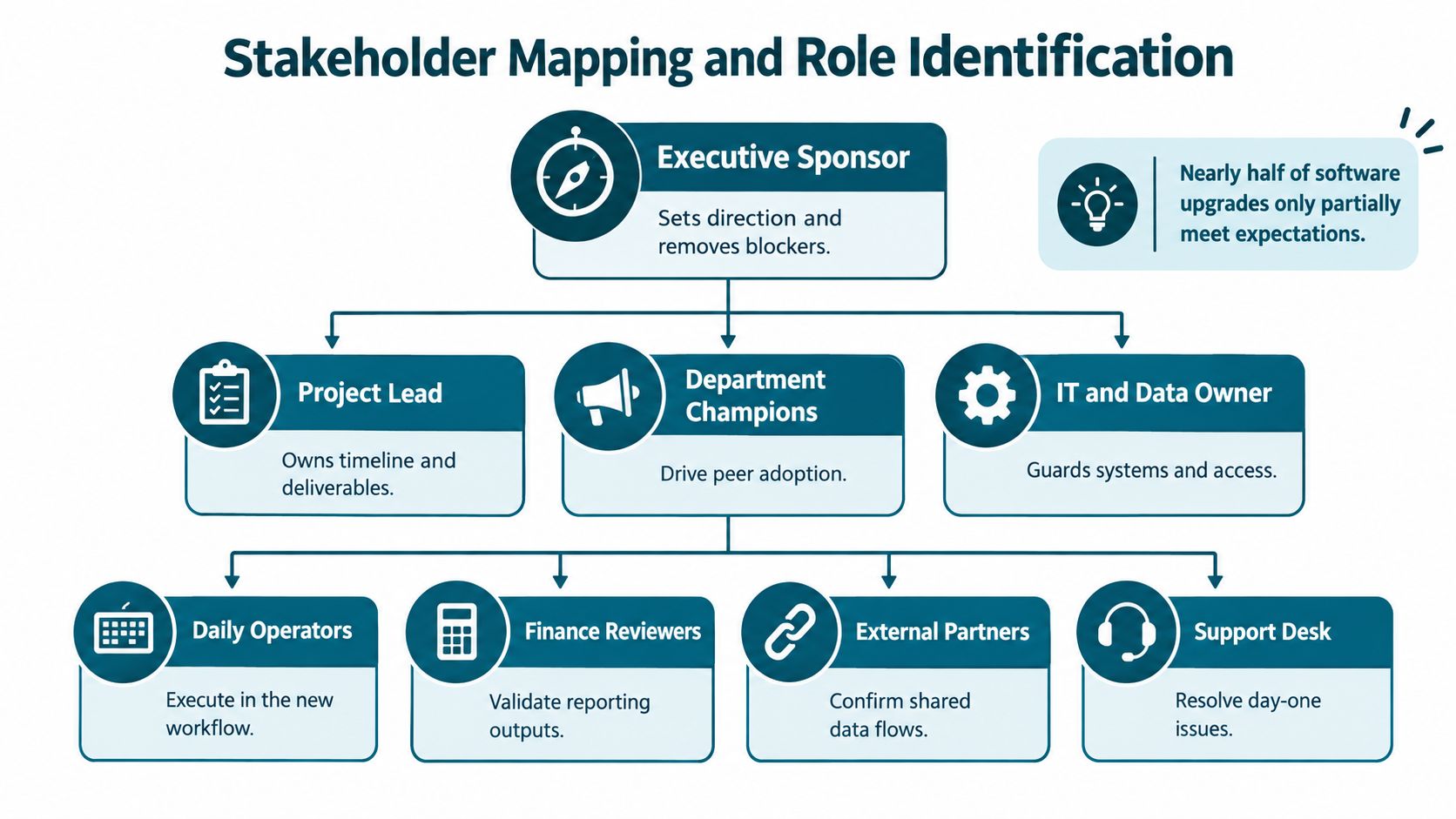
Map responsibility across six questions: who enters data, who reviews exceptions, who approves decisions, who produces outputs, who manages access, and who depends on the result downstream. That exercise sounds simple. It is usually where hidden control gaps appear.
I look for ownership at field level and decision level. A planner may enter quantities but have no authority to amend dates. A finance reviewer may approve a threshold exception but not create a vendor. A team lead may release a report but depend on someone else to validate the underlying change. Those distinctions shape routing, audit history, and escalation paths. They also determine whether a parallel run will test the operating model or only a simplified version.
Access design should follow those responsibilities. Giving every user a digital copy of the same spreadsheet logic recreates the old weaknesses in a different interface. Use explicit roles and permissions, and translate informal workbook access into controlled rules such as view, edit, approve, release, and administer. This guide to role-based access control in web applications is a practical reference when teams need to turn spreadsheet habits into enforceable access rules.
Then formalize governance. Name an executive sponsor to remove blockers, a project lead to own decisions, department champions who can challenge process gaps, and a data or IT owner responsible for dependencies and access. Add super-users, finance reviewers, and support staff before pilot work starts. Keep a change log with the decision, reason, owner, date, and affected workflow. That record prevents a late request from changing a calculation without retesting the controls around it.
The sponsor's message matters too. Frame the change around controlled approvals, traceable decisions, and dependable reporting. That gives operations teams a standard they can test against.
Data Migration and Validation Protocols
A migration usually fails in quieter ways than teams expect. The screen loads, records appear, and the first totals match. Then an exception hits. A blank field routes an order incorrectly, a linked record drops during import, or an approval lands with the wrong person. Operations teams feel those faults first, because control breaks before reporting does.
Evidence from spreadsheet research supports that caution. Research covering operational spreadsheets found formula-cell error rates ranging from 0.8% to 1.8%, depending on how errors were defined. A separate analysis identified 381 possible errors, of which spreadsheet developers confirmed 117, and 40% of the confirmed errors had no quantitative effect on reported results (Tuck School of Business spreadsheet error analysis). Hidden weakness matters in changeover work because a process can appear numerically correct while approvals, dependencies, or exception handling have already drifted.
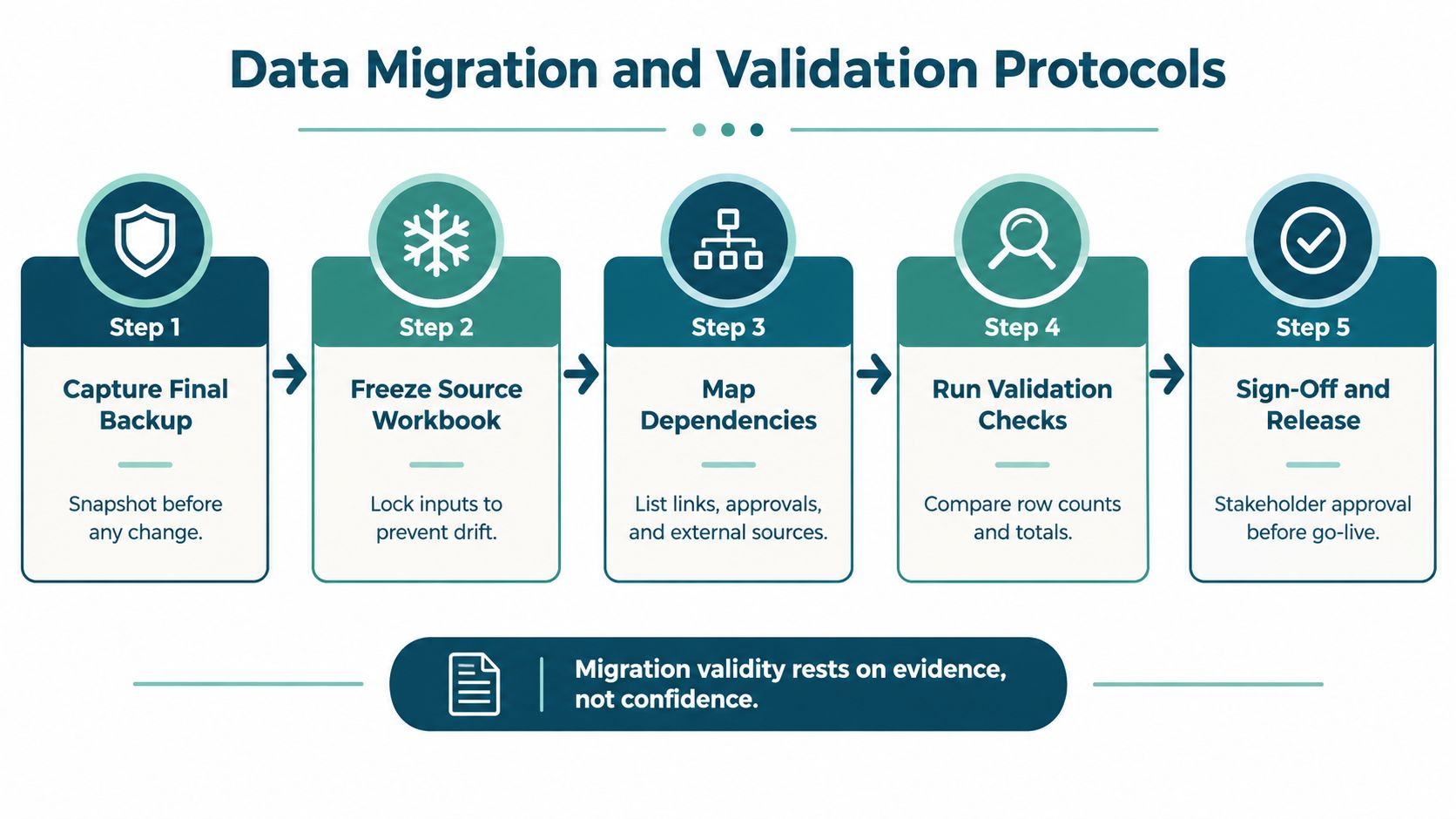
Treat migration as a controlled operating event. Start by saving a dated, restorable backup of the final workbook state. Then freeze edits and name the person who owns that final source version. After that, document the dependencies that usually get missed under time pressure: external links, macros, approval steps, source feeds, generated documents, and downstream recipients. Only then should the team configure the target system's structures, calculations, validation rules, permissions, and outputs.
Validation needs more than a spot check. Run comparisons for record counts, totals, field types, required values, duplicate handling, parent-child relationships, and calculation outputs. Keep manual review in the loop for exceptions, unexplained variances, and any document or workflow that automated tests do not cover well. Release approval should come from the business owner after those checks are complete, not from technical completion alone. This data migration best-practices guide is a useful reference for repeating those checks against the actual release dataset, because the source often changes between test migration and go-live.
I usually tell teams to validate the control points before the easy cases. Focus first on workflows tied to pricing, finance, staffing, inventory, compliance, customer commitments, and approvals. Then test normal transactions, boundary conditions, invalid entries, duplicates, missing values, overrides, and generated documents.
For every scenario, keep the original input, original output, replacement output, variance, explanation, tester, and approval status in one reconciliation record. That record is the audit trail. It gives operations leaders something they can review, challenge, and sign off.
Parallel validation works best when ownership is explicit. Set a fixed validation window, define which system is authoritative for each field, assign one person to resolve each variance, and log the final decision on every material difference.
Cutover Approaches and Rollback Strategy
The original workbook should be retired when the replacement has met agreed operational conditions, not when the technical team says the application is live. A 2025 study of eight public-sector organisations found that 45% of employees continued using parallel manual and digital systems, while 30% were not optimally trained (study of digital transition in public-sector organisations). Parallel operation can reduce risk, but unmanaged coexistence creates conflicting records and duplicated effort.
Compare the available approaches
| Approach | Best For | Risk Level | Validation Required |
|---|---|---|---|
| Staged cutover | Teams moving lower-risk workflows first, then critical processes | Moderate, because dependencies must be controlled across stages | Scenario testing, role approval, and reconciliation at each stage |
| Parallel run | High-impact workflows where one complete operational cycle can be compared | Moderate if time-boxed, high if both systems remain unofficially active | Same inputs through both systems, reconciliation ownership, defined retirement date |
| Big bang | Small, well-understood workflows with limited dependencies and strong confidence in testing | Highest disruption risk if an exception appears after release | Complete validation, trained users, restored backup, and tested rollback |
A staged cutover suits teams that can separate intake, review, approval, and reporting without breaking the process. A parallel run is more defensible for a monthly or quarterly workflow, provided the overlap lasts long enough to observe the full cycle. A big-bang switch may be appropriate for a low-risk tracker, but it's a poor default for pricing, finance, compliance, or customer commitments.
Define the retirement gate
Agree the exit criteria before launch:
- No unexplained variances remain in critical reconciliations.
- All critical user acceptance tests are complete and approved.
- Backup restoration has been confirmed, not merely assumed.
- The rollback window has been tested with named decision-makers.
- The legacy file is read-only and has a dated archival copy.
- The authoritative system is documented for every important field and output.
Keep exportable records and specify who can authorise temporary reversion. Reversion shouldn't mean returning to uncontrolled editing. It should mean restoring a known source state, recording transactions handled during the incident, and reconciling them before normal operation resumes.
Role-Based Training and Communications
Training fails when it teaches buttons instead of work. A finance reviewer doesn't need a tour of every screen. They need to know how to review an exception, reject a submission, approve a result, and find the evidence behind a generated report.

Train around real tasks
Build a short curriculum for each role:
- Operators: Enter a realistic transaction, correct a validation error, and hand off an unresolved issue.
- Reviewers: Filter exceptions, inspect history, request clarification, and record a decision.
- Approvers: Check the supporting information, approve or reject, and understand the effect on downstream outputs.
- Administrators: Add or remove access, handle a role change, and escalate a system incident.
- Managers: Read the operational dashboard, interpret exceptions, and confirm the process is being followed.
Pilot with both confident power users and sceptics. Measure task completion time, error and rework rates, support requests, adoption by role, and proficiency on real scenarios. Revise forms, labels, instructions, and permissions before wider release.
Prosci reports that initiatives with excellent change management are up to seven times more likely to achieve success, with objectives met or exceeded by 88% of participants with excellent change management versus 13% with poor change management (Prosci change-management success research). These are vendor-research benchmarks, not guarantees, but they support treating adoption as a funded workstream.
Communications should tell people what changes, when it changes, what they must do, and where they get help. Send the cutover date early, explain the retirement rule for the old workbook, and publish a named escalation route.
After the final rehearsal, provide floor support through the first close or reporting deadline. A short dual-run period, daily issue triage, and rapid access to someone who understands both the old process and the new system will surface problems while they're still manageable.
The following video can supplement a role-based discussion about adoption and operational change:
KPIs and Post-Launch Support
A replacement isn't successful because users can log in. It's successful when the operation completes work reliably, exceptions reach the right person, approvals leave evidence, and the old workbook no longer competes with the new process.
Set a baseline before cutover, then compare the same measures during validation and after retirement. The dashboard should combine process performance with adoption signals, because a technically correct application can still fail if people route work around it.
Track the work that matters
Use a small set of operational measures:
- Completed transactions: Count work completed through the replacement, by workflow and role.
- Exception rate: Track how often submissions require correction, escalation, or manual intervention.
- Reconciliation results: Record variances between source data, replacement outputs, and downstream documents.
- Rework frequency: Identify repeated entries, reopened approvals, corrected calculations, and regenerated documents.
- Support demand: Group requests by severity, role, workflow, and root cause.
- Task abandonment: Find where users stop, switch back to Excel, or ask someone else to complete the task.
- Adoption by role: Check whether each user group performs its assigned work in the authoritative system.
Keep a change log and release owner in place after launch. Define incident severity levels, test backup restoration, and review performance at 30 and 90 days. Those reviews should produce decisions, not just observations: simplify a form, revise a validation rule, change an approval route, or retire a workaround.
Retire the file without losing evidence
Archive a dated, read-only copy of the original workbook with its supporting inputs, outputs, and reconciliation record. Don't leave it in a shared folder with a filename that suggests it remains available for everyday editing. If users can still choose the old file whenever the new workflow becomes inconvenient, the organisation has created two competing systems.
Assign one accountable owner for go or no-go decisions and post-launch improvements. That owner should monitor usage, approve releases, coordinate support, and decide when a temporary rollback is closed.
An operational-control perspective changes the definition of completion. The work is complete when the replacement has passed evidence-based validation, users can perform their tasks, exceptions have owners, records can be recovered, and the legacy workbook has become reference material rather than a live process.
Spreadsheet Upgrade converts business-critical Excel workbooks into purpose-built web applications, beginning with an assessment of users, calculations, handoffs, permissions, and edge cases, followed by a scoped build and guided transition. If your operations team needs a controlled replacement rather than another shared file, visit Spreadsheet Upgrade to discuss the workflow, validation approach, and cutover support.