At seven on Friday morning, the finance director opens the master workbook, takes in the latest sales and operations files, rebuilds a few tabs, checks the totals against last week and copies the results into the management pack. Then comes the pause before distribution: has anyone changed a formula, or is this finally the right version?
That routine is familiar in UK SMEs because the recurring management report spreadsheet often starts as a practical way to bring information together. The strain appears when the workbook becomes the weekly process for collecting inputs, calculating KPIs, checking exceptions, securing approval and issuing a pack. This guide sets out how to make that process more controlled, from KPI design and input consolidation to version management and distribution, without rebuilding the pack by copy and paste every Friday.
The Friday Morning Pack and Why It Keeps Breaking
The familiar Friday routine rarely fails because one person is careless. It fails because a process that depends on repeated manual steps has no dependable structure around those steps. One colleague sends a file late, a department changes the way it labels a measure, or a formula gets overwritten while someone fixes a number for the board pack. The finance director then has to work out whether the workbook is wrong, the input is incomplete or the latest circulated copy has been changed.
A recurring report is more than a worksheet refreshed on a schedule. It combines data collection, calculations, review, interpretation and distribution. Each cycle creates opportunities for inconsistent assumptions, competing versions and delays. Spreadsheet use in reporting has deep roots: a review of spreadsheet-risk research cites IDC findings that 85 percent of surveyed organisations used spreadsheets for reporting and forecasting, and says spreadsheets were used about 65 percent of the time in financial reporting and management accounting (spreadsheet-risk research review). The point isn't that every spreadsheet is a problem. It's that repeated reporting work is often embedded in spreadsheets because they're flexible and familiar, even when the operating process around them hasn't been made reliable.
Symptoms that the current workbook is reaching its limit
Look for recurring signs, not one awkward Friday:
- One person knows how it works. Others depend on that person to refresh or repair the workbook.
- The pack is rebuilt by hand. Copying figures across tabs and files is routine rather than exceptional.
- The same checks happen from memory. Completeness, period dates and reconciliations aren't captured in a reliable checklist.
- The issued version is unclear. People aren't sure which file was approved or whether it changed after circulation.
- Commentary sits away from the KPI. Managers see the movement but can't readily find its cause, owner or next action.
The practical promise is simple: make the Friday pack a controlled, repeatable process. The right answer may still be a workbook, but it shouldn't depend on last-minute reconstruction and one person's memory.
It Is Not a Model Anymore, It Is an Operating Process
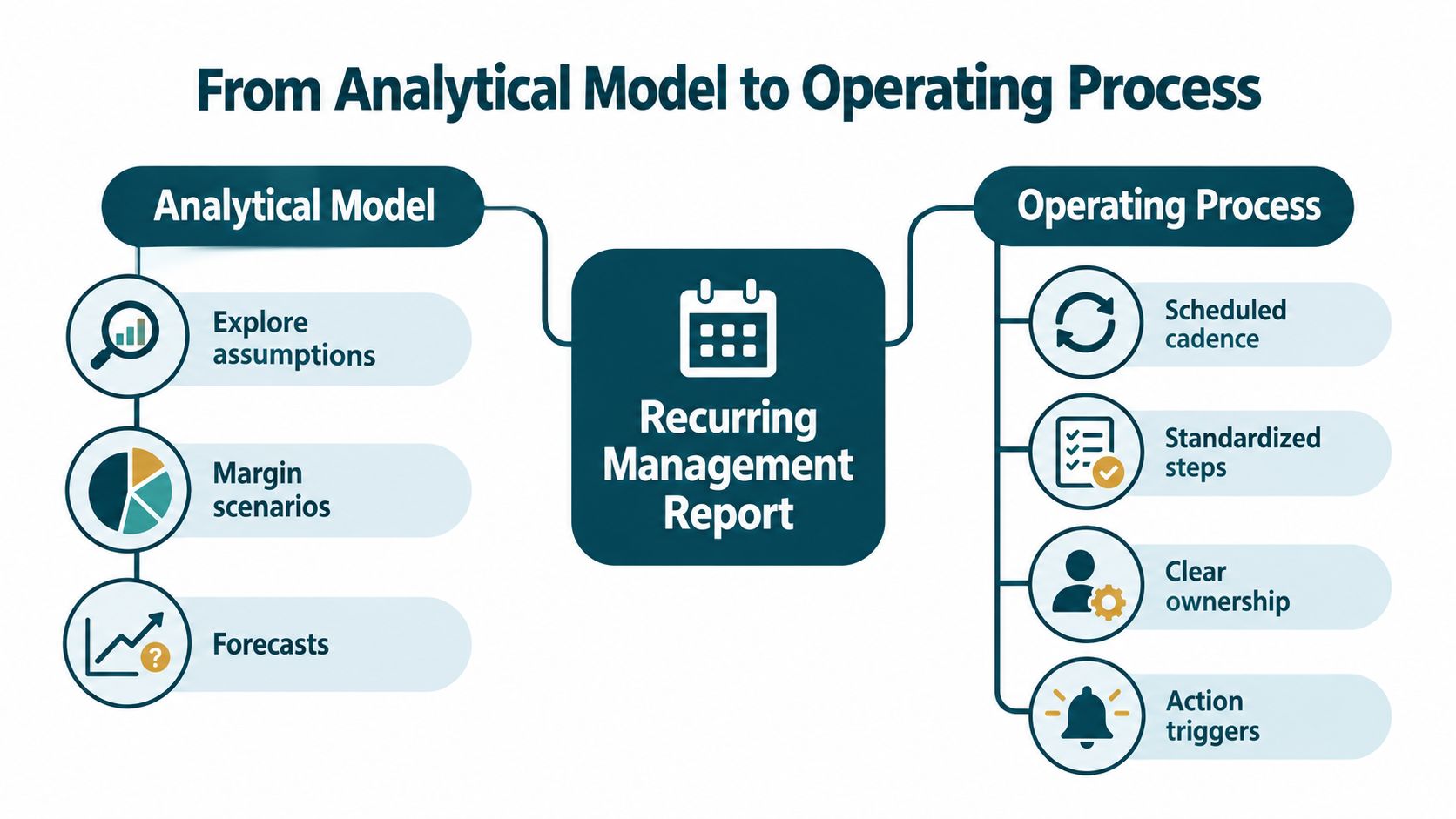
An analytical model helps someone explore a question. A finance colleague might test margin assumptions, compare forecasts or assess the effect of a pricing change. That kind of work benefits from flexibility: the user changes an assumption, examines the result and learns something.
A Friday management pack has a different job. It collects the same categories of information, applies agreed KPI definitions, checks the results, supports decisions and produces a report for circulation. When the workbook does all of that every week, it's an operating process disguised as a model. Treating it as a one-off analysis is why the file accumulates ad hoc tabs, undocumented edits and handoffs that only make sense to its regular operator.
What changes when the workbook runs the process
The work becomes predictable only when the steps are defined. Someone owns each input. The reporting period has a clear cut-off. The calculations use consistent definitions. A reviewer checks exceptions and approves the version that will be issued. If one of those steps lives only in a colleague's head, the business hasn't got a controlled reporting process, even if the spreadsheet looks polished.
That distinction matters because repeat use brings repeat risk. In a systematic review of spreadsheet research, an Enron email-archive dataset included 15,770 spreadsheets, of which 24 percent contained errors; among formulas with errors, 59 percent had at least one dependent cell (spreadsheet-error evidence summarised for Parliament). Those findings don't establish that a particular Friday pack is wrong. They do show why a recurring workbook needs protected logic, deliberate review and a record of the version issued.
Practical rule: If the same workbook collects, calculates, checks and distributes information on a schedule, govern it as a process, not as a file.
The goal isn't to remove spreadsheet flexibility from analysis. It's to stop relying on an analytical model to perform an operational job without clear ownership, controls or a dependable handoff.
Designing KPIs Around Decisions, Owners and Thresholds
Start with the management decision, not a list of familiar measures. If a KPI doesn't change what someone reviews, approves or does, it may be taking up space in the pack without helping management. Decide what question the measure should answer, then assign a person who can explain the result and act on it.

Build each KPI around a response
For each measure, define the decision first, then its owner, trigger and expected action:
- Decision: What should a manager decide or review after seeing this figure?
- Owner: Who is accountable for explaining movement and coordinating a response?
- Threshold: What agreed condition should prompt attention? Keep the definition visible and controlled rather than embedding an unexplained value in a formula.
- Action and due date: What should happen, and by when? Record the action in the pack with one accountable owner and a status that carries forward until closure.
- Measure and commentary: State what's being counted, its reporting period and its source. Put the explanation next to the result, not in a cell note a reader might never find.
Separate lag measures, which show what has already happened, from lead measures, which help managers monitor activity that may affect future results. For example, a revenue figure may show an outcome, while a measure of overdue customer follow-ups may give the sales lead an opportunity to act. Use both only when each serves a clear decision.
Government project-delivery guidance says reports should make variances and problem areas easy to identify, and that material deviations should be recorded with their causes (UK project-delivery control guidance). Apply that discipline in the spreadsheet: include a variance, the reason for it, the owner, the proposed response and the expected completion date. Don't bury the explanation in a paragraph detached from the figure it explains.
The sample below is a structure, not a set of recommended measures:
| KPI | Definition and period | Owner | Trigger for review | Action | Due date | Status and evidence |
|---|---|---|---|---|---|---|
| Measure name | What is counted and which period it covers | Named role or person | Agreed threshold or condition | Specific next step | Agreed date | Current status and closure evidence |
Keep the KPI definition alongside its reporting logic. That way, when a team member asks whether a figure changed because performance moved or because the definition changed, the pack has somewhere useful to look.
For practical context on how management reporting can be turned into action, see this short video.
Consolidating Inputs Without a Brittle Master Spreadsheet
The temptation is to pull every department's workbook directly into one master file. Resist the urge to build hundreds of cross-sheet links. A sprawling workbook can be hard to refresh, review and hand over, especially when source files change structure or a colleague moves a column without telling finance.

Choose an input method the team can maintain
There are sensible ways to consolidate inputs. They offer different trade-offs, and none can compensate for unclear ownership or inconsistent definitions.
Structured copy-in is the most straightforward. Each team submits information in an agreed format, and a finance owner places it in a staging tab with the source file, reporting period and submitting owner recorded. Add checks for required fields, duplicate records and missing periods. This still involves manual work, but it's more inspectable than copying figures into whichever report tab happens to need them.
A controlled staging area works better when the pack draws from several repeatable sources. Keep the imported or pasted records in one clearly labelled place, then have the reporting calculations read from that area. This avoids maintaining a web of references across many source tabs. Make refresh points explicit, and check that the totals in the staging area reconcile to what the source provides.
External connections can reduce repeated handling when they're supported and someone is responsible for maintaining them. Excel's Power Query, database connections such as ODBC, or Google Sheets' IMPORTRANGE can bring data into a central view. They also introduce dependencies: permissions, connection settings, source layouts and refresh behaviour can all affect the pack. A connection that nobody understands is not reliable automation.
Whichever approach you choose, define the source mapping alongside the KPI definition. Record what source field supplies each measure, how it's transformed and which reporting period it belongs to. Otherwise, the team may consolidate the data consistently while changing what the KPI means.
Internal-audit guidance identifies controlled storage, validation, completeness checks and balancing tests as core spreadsheet controls, including tests that confirm all source records are represented in reported totals (internal-audit spreadsheet controls guidance). Use those checks at the consolidation point. If finance can't explain where a total came from, the report isn't ready to go out.
Validation, Access Control and the Audit Trail a Recurring Pack Demands
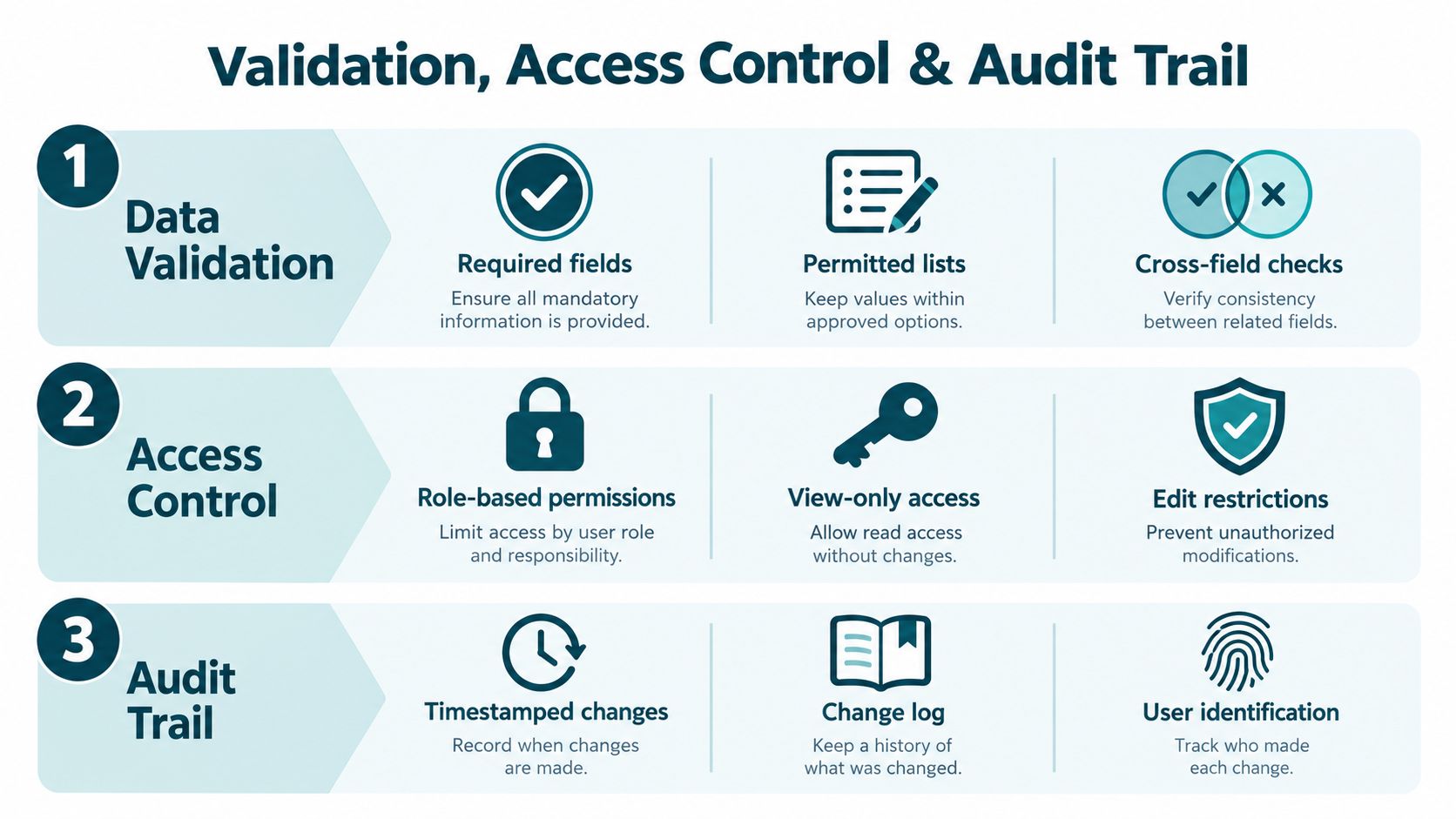
Validation and access control belong together. If contributors can enter incomplete or inconsistent data, the report needs checks. If they can freely edit formulas and definitions, a check may no longer mean what the reviewer thinks it means.
Make a failed check visible before sign-off
Use input rules for required fields and permitted values. Add cross-field checks for period completeness, such as flagging a departmental submission whose period doesn't match the pack. Reconcile totals to the source, and display missing or unusual inputs as exceptions for review rather than letting them flow into a headline figure unnoticed.
Protect the calculation and KPI-definition areas from casual editing while leaving the required input fields accessible to contributors. Where your platform supports it, use individual accounts or role-based folders so people can change what they're responsible for without editing the whole pack. Archive the approved issue as a read-only file or signed-off copy, rather than treating the live workbook as the definitive record.
Record what changed and what was checked
A useful audit trail should help a new reviewer reconstruct the issued figures. Keep the reporting period and version clear, record who made an authorised change and when, and note what was tested before approval. A dedicated change log can capture the tab or calculation affected, the reason for the change and the person who reviewed it. A timestamp on its own isn't enough if nobody can connect it to a change or decision.
This isn't bureaucracy for its own sake. It's how the finance director distinguishes a legitimate correction from an unapproved edit and how the team avoids repeating a review from memory. In the Enron-related sample described earlier, erroneous formulas often had dependent cells, so a changed calculation can affect other outputs rather than only the cell being edited.
Set permissions and working practices to match the roles in your actual process. For guidance on controlling edits in a shared workbook, see Excel permissions for multiple users. Then test the controls with the people who prepare, review and approve the pack. A control that exists only in a policy document won't stop a Friday mistake.
Scheduling, Distribution and the Friday Automation Sequence
A controlled Friday cycle starts with a cut-off, not with someone opening the workbook and hoping all the inputs have arrived. Set a clear deadline for submissions and decide when the refresh takes place. If late data must be included, define who can authorise it and how the exception will be marked.
A repeatable issue sequence
A practical cycle runs in a defined order:
- Collect inputs. The responsible owners submit their data through the agreed channel, with the reporting period identified.
- Refresh and check. The pack owner refreshes the staging area and checks source completeness, dates, formula or query integrity and the reconciliation to the previous period.
- Review exceptions. Investigate missing records, unusual movements and failed checks. Record the cause, owner and proposed action rather than removing the warning to make the report look tidy.
- Approve the issue. The designated approver reviews the pack and signs off the version that's going to managers.
- Publish and archive. Share the approved file through a controlled location, with a clear version name. Save the issued snapshot separately from the live working file.
The published pack should mean one specific thing: the archived version that was approved and circulated. A live workbook that remains open to edits is not an adequate record of what managers saw. Use a named distribution list or controlled shared link rather than creating a trail of email attachments with almost identical names.
European Commission accounting guidance documents an audit case involving vouchers retyped into spreadsheets. The auditors identified inverted digits, duplicate entries and incorrect formulas, leading to corrections to an interim report and suspended payments while those corrections were prepared (European Commission accounting guidance). It's a clear reason to reduce repeated re-keying and keep an auditable source record.
Calendar reminders and threshold alerts can help owners act before the meeting, but they shouldn't replace ownership or approval. For examples of recurring operational workflows beyond the pack itself, see workflow automation examples.
Signals That the Workbook Has Become a System and What to Do About Them
A workbook has become a business system when it coordinates people, inputs, calculations, approvals and decisions on a recurring basis. The question isn't whether Excel is good or bad. It's whether the current setup can reliably support the work the business has given it.
UK project-delivery guidance warns that spreadsheets stored outside a formal document-management system may not record who changed what or when, and recommends update management measures such as version control (UK guidance on information and data management). For a recurring pack, that means retaining issued versions and making corrections visible instead of overwriting last week's file.
| Warning sign | What it usually means | Likely next step |
|---|---|---|
| One person is the only reliable operator | The process depends on individual knowledge | Document the handoffs and test a backup owner |
| Circulated copies disagree | The issued version isn't controlled | Keep a master working file and archive each approved issue |
| Reconciliation takes longer each cycle | Inputs or definitions aren't stable enough | Review source mapping, checks and KPI ownership |
| Sign-off is required but difficult to prove | Approval sits outside the record | Add an explicit approval step and retain the approved snapshot |
| The same file serves several teams | Permissions and responsibilities may be unclear | Define roles and restrict changes to the right areas |
| The impact of a wrong number is growing | The current controls may not match the consequences | Assess whether a managed application is a better fit |
Keep Excel where flexibility is useful, upgrade where control is central
A standard product is a fair fit when its workflow, permissions and reporting already match the way your team works. A workbook can also remain suitable when its inputs are stable, its logic is understandable and an assigned owner can maintain the controls. But don't use the size of the file or the number of users as the sole test. A compact weekly pack can still be operationally important and difficult to govern.
A managed custom web application is stronger when the process needs controlled inputs, individual access, visible version history, automatic calculations, approvals or reminders in one dependable interface. It can replace the row-and-column workflow with screens and forms designed around how people submit, review and act on information. Spreadsheet Upgrade converts business-critical Excel workbooks into purpose-built web applications and manages them as ongoing services. Its structured assessment is intended to map the users, calculations, handoffs and constraints before a build is scoped; current commercial details are available on the pricing page. For broader context, see replacing Excel with a web app, and read about spreadsheet scalability for growing businesses.
A Free Fit Check is an initial way to discuss whether a recurring pack is suitable for an upgrade, not a promise that a custom application is the answer. Use it to outline how inputs arrive, who reviews them, which decisions the pack supports and where the current process fails. If there's a fit, the next step is to assess the workflow and agree the scope; if there isn't, you'll have a clearer basis for improving the workbook you already use.
Before You Start the Next Friday Cycle
Bring these questions to your next management meeting:
- Who owns each input, KPI definition and approval?
- What makes an input complete and the reporting period correct?
- Which checks must pass before the pack can be issued?
- Where will the approved version be stored, and how will a correction be recorded?
- Does the pack connect each important movement to a decision, owner and action?
If the answers depend on memory or one person being available, the reporting process needs attention. Start a Free Fit Check at Spreadsheet Upgrade to discuss whether your Friday management pack should remain a controlled workbook or move to a managed application.
Start with a Free Fit Check
If an important spreadsheet has become part of the way your business runs, start by checking whether the process is a good fit for replacement.