
An audit is approaching. Your compliance register is open on a shared drive, but the status column says “complete” without showing who approved the control, where the evidence is stored, or whether the renewal date was checked. One owner has left the business, a regulatory requirement changed recently, and several rows contain different date formats. The workbook may look populated, but it won't give you confidence when someone asks for a defensible audit trail.
A reliable compliance register spreadsheet is more than a list of obligations. It's a controlled evidence system that connects each requirement to an accountable owner, an operating control, supporting evidence, review dates, exceptions and sign-off. Excel can support that discipline for a time, but only if the workbook is designed around the way compliance work is performed.
Why Your Compliance Tracker Needs to Be an Evidence System
Many teams start with a sensible idea. They create columns for the regulation, requirement, owner, due date and status. The file grows as new obligations arrive, and the tracker becomes the place people check before an audit, board meeting or renewal cycle.
The trouble begins when the workbook records only the current position. A green “complete” status doesn't explain what was completed, when it happened, which document proves it, or whether the control remains effective. A free-text note such as “reviewed with finance” is difficult to test and almost impossible to defend when the person who wrote it is unavailable.
Practical rule: If a row can't show the obligation, the owner, the evidence and the decision history, it isn't audit-ready.
The recordkeeping principle is clear in Article 30 of the EU General Data Protection Regulation. Controllers and, where applicable, processors must maintain written records of processing activities, including electronically stored records. Those records include the purposes of processing, categories of data subjects and personal data, recipients, international transfers, planned erasure time limits where possible and a general description of security measures. They must also be made available to a supervisory authority on request. See the Article 30 requirements for records of processing activities for the underlying obligation.
That doesn't mean every compliance register must copy a GDPR processing register. It does show why the workbook should preserve explainable records, rather than just displaying a current status. A reviewer needs to understand how the organisation identified the obligation, decided it applied, assigned responsibility, operated the control and retained evidence.
What audit-week questions expose
During audit preparation, the same questions tend to surface:
- Who owns this requirement today?
- Why does it apply to our business or this location?
- Which version of the policy or record proves compliance?
- Was the review completed by the required date?
- Who approved the exception?
- What changed since the previous review?
- What happens if the owner doesn't respond?
A register that answers those questions from linked, structured fields is useful throughout the year. A register that needs several days of reconstruction is an administrative burden disguised as a control.
This is related to, but distinct from, an Excel audit trail. An audit trail focuses on preserving record-level history and evidence requirements, while the compliance register focuses on the obligation lifecycle, including applicability, ownership, renewals, control status and escalation. Keep those purposes connected, but don't reduce the register to a document index. The Excel audit trail guidance covers the separate history problem in more detail.
A well-run register should let an operations manager filter all obligations due for review, identify missing evidence, see unsigned approvals and escalate overdue actions without opening every supporting file. That standard changes the design decision. The workbook isn't just helping people remember tasks. It's helping the organisation demonstrate that compliance activity was identified, performed, reviewed and retained.
Designing the Core Register Layout and Fields
Start with the row, not the dashboard. Each row should represent one distinct requirement or obligation that can be assessed, assigned, controlled and evidenced. If a single row combines several unrelated requirements, owners will mark it complete even though only part of the work has been done.
The register should separate reference fields, which change only through controlled review, from workflow fields, which authorised owners update during normal operations. This separation makes it harder for a user to overwrite the regulatory wording while updating a review date.
A practical field blueprint
Use a stable requirement identifier such as DATA-RET-001 or another convention that remains unchanged when the owner or status changes. Record the regulatory source and the applicability rationale in separate columns. “GDPR” may identify the framework, but it doesn't explain why a particular obligation applies to your processing activity, entity or jurisdiction.
The control description should state what the organisation does in practice. Avoid copying a requirement into this field. “Access reviews completed” is weaker than a description that identifies the system, responsible team, review frequency and expected output.
| Field category | Column name | Purpose and data type |
|---|---|---|
| Reference | Requirement ID | Unique text identifier that remains stable over the obligation lifecycle |
| Reference | Regulatory source | Framework, legislation, regulator or contractual source |
| Reference | Requirement wording | Controlled text describing the obligation |
| Applicability | Applicability rationale | Text explaining why the requirement applies or does not apply |
| Accountability | Accountable owner | Named person responsible for the outcome |
| Control | Control description | Text describing the implemented process or control |
| Evidence | Evidence location | Hyperlink or structured path to the supporting record |
| Review | Review frequency | Controlled value such as monthly, quarterly or annual |
| Workflow | Status | Validated choice such as not started, in progress, complete, overdue or exception |
| Workflow | Target date | Validated date for completion or renewal |
| Exception | Exception rationale | Explanation, risk acceptance and expiry information for an exception |
| Approval | Sign-off status | Pending, approved, rejected or withdrawn |
| Approval | Approval history | Signatory, date, decision and reference |
| Reporting | Risk rating | Controlled value used for filtering and prioritisation |
| Governance | Last review date | Date the obligation or control was last assessed |
| Governance | Next review date | Calculated or entered date for the next required review |
This field structure follows the recommendation that every row should include a unique requirement identifier, regulatory source, applicability rationale, accountable owner, control description, evidence location, review frequency, status, target date, exception rationale and approval history. The European spreadsheet governance case study also supports recording sign-off, version history, validation activity, dates and reviewers.
Keep evidence separate from status
Don't use a status value as a substitute for evidence. “Complete” is a conclusion. The evidence link is what allows another person to verify the conclusion.
Use one evidence field for the primary record and, where needed, separate fields for evidence type, evidence period and evidence owner. A renewal obligation might point to a current certificate, while an operating control might need a report, meeting record or sample review. If the workbook stores several links in a single note, reviewers will struggle to tell which document supports which decision.
A useful design also distinguishes control effectiveness from obligation status. An obligation can be marked complete because the annual review happened, while the review itself identified a control weakness. Keep those conclusions in separate columns so that completion doesn't conceal an unresolved issue.
The register should also support reporting without forcing users to interpret prose. Use data validation for status, risk, review frequency and sign-off. Agree the allowed values before building charts or filters. A column containing “Done”, “Complete”, “Closed” and “Finished” may look harmless, but it creates several categories for the same outcome.
If the workbook contains linked entities such as obligations, owners, evidence records and approvals, review whether a relational structure is more appropriate than one oversized sheet. The explanation of a relational table database in Excel is useful when repeated information starts creating duplicate entries and inconsistent updates.
Enforcing Data Validation and Audit Trails
A carefully designed layout still fails if anyone can type anything into every cell. The control environment needs to restrict inputs, protect formulas and preserve what happened after a change.
Excel's native tools can provide a useful baseline. Apply data validation to dates, owners, status values, risk ratings and review frequencies. Use date rules that reject text and implausible entries, and use dropdown lists for fields that feed reports. Lock formula cells, protect worksheets and make the editable input ranges obvious.
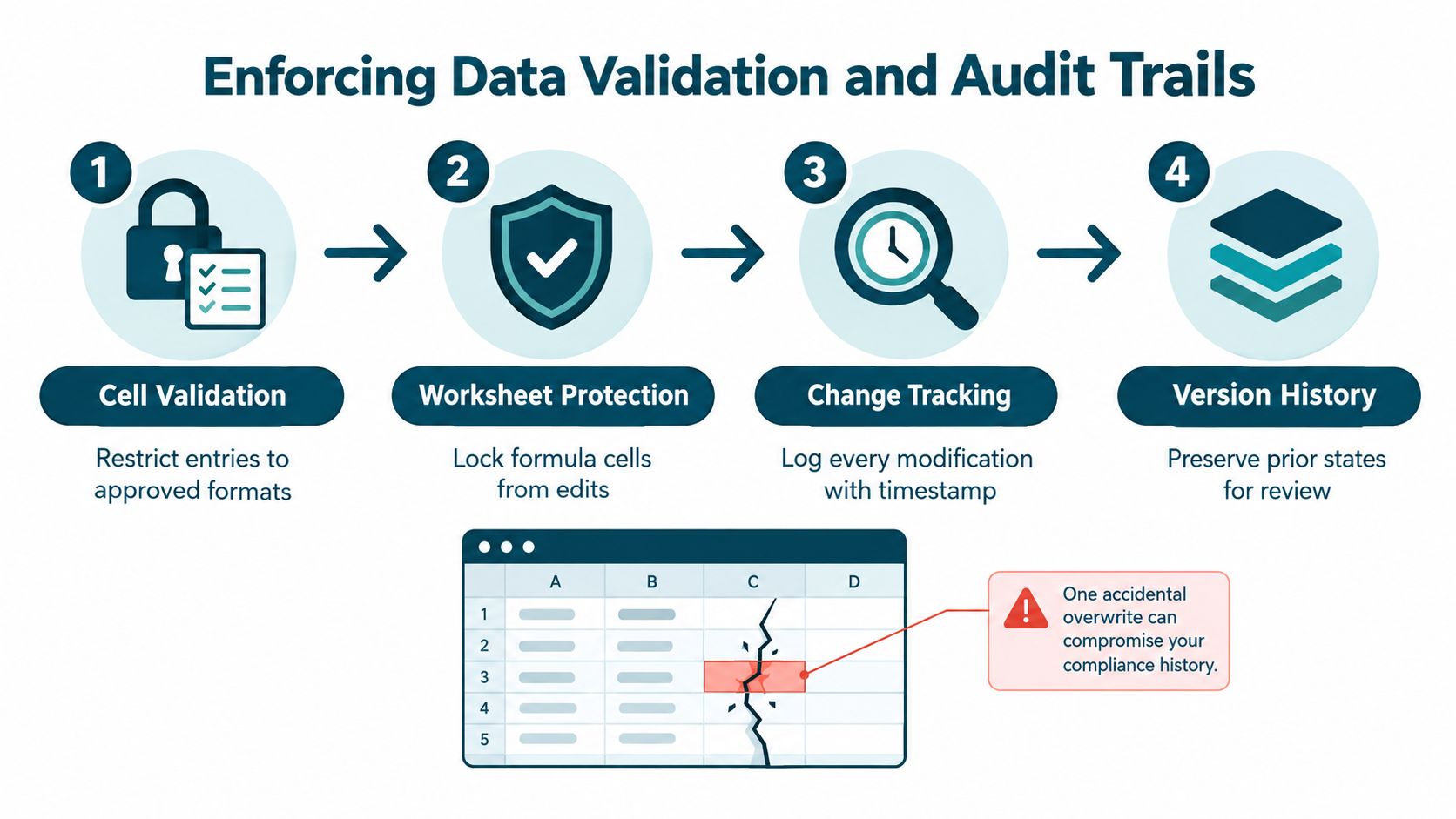
Validation reduces ordinary data-entry mistakes, but it doesn't prove who changed a valid value. A user can enter a valid date that is still wrong, replace a supporting link or remove a row. Worksheet protection can limit casual edits, but it shouldn't be treated as a complete record of accountability.
Why one update column isn't enough
A single “Last Updated” column records only the latest visible date. It can't show who changed a due date, whether a requirement was deleted, what the previous owner was, or which evidence supported a status transition.
The stronger approach is an append-only change log. Each change should create a new history row containing:
- Register ID: The obligation affected by the change.
- Field changed: The specific column or attribute edited.
- Previous value: The value before the edit.
- New value: The value after the edit.
- Actor: The person who made the change.
- Synchronized timestamp: The recorded time of the event.
- Change reason: The business explanation for the update.
- Approval or ticket reference: The related sign-off or service record where applicable.
NIST guidance describes audit trails as records of computer, application or user events and says logs should be protected against unauthorised access and modification. It also identifies digital signatures or equivalent integrity mechanisms as ways to detect tampering. The NIST audit trail guidance supports capturing what happened, when and where it happened, the source, the outcome and the associated identity.
Protect the history sheet from ordinary editors. Restrict deletion rights, retain read-only snapshots and make the active register reconcile against the change log. If you use macros or external automation to write the log, test them independently and document what happens when the process fails.
A practical approval workflow should also distinguish an owner updating a row from an approver accepting the outcome. An owner can submit evidence, but the approval record should capture the decision separately. Use a structured approval workflow in Excel if the current process already needs submissions, reviews, rejections and resubmissions.
Treat the workbook as a controlled application
Inventory the workbook's formulas, input ranges, macros, exports and linked files. Record who can edit each area and who checks the calculations. A formula that drives a compliance dashboard is part of the control environment, not an invisible convenience.
The workbook should have a named owner, a defined storage location, a backup process and a documented release version. Review the log for unexpected deletions and compare important snapshots over time. These measures won't turn Excel into a full workflow platform, but they can make the register more reviewable while it remains within its practical limits.
A register that captures history as work happens is far stronger than one reconstructed before an audit. The difference is operational discipline, not visual polish.
Managing Regulatory Change and Staff Turnover
Adding a new row whenever a regulator publishes an update feels productive. It can also make the register less reliable if nobody records how the new requirement relates to the old one, who assessed the impact or when the revised obligation became effective.
Regulatory change management needs its own workflow. Version each obligation, record the effective date, identify the affected jurisdiction or business process, document the impact assessment and preserve the previous position. If the requirement changes from one review cycle to the next, don't overwrite the old wording and call the row current. Retain the prior version so the organisation can explain what it believed, assessed and implemented at the time.
Research cited in the PwC Global Compliance Survey reports that 85% of surveyed executives globally said compliance requirements had become more complex over the previous three years, while 64% said regulation was the leading barrier to reinvention. The same source identifies regulatory change as the top challenge for 32% of respondents, while only 20% described their approach as highly proactive.
Use change triage instead of row accumulation
Create a change record or linked change sheet with enough information to answer five questions:
- What changed in the source requirement?
- Which obligations, processes and locations are affected?
- Who assessed the impact?
- What decision did the organisation make?
- Which control, owner and deadline resulted?
A change may require no action, a wording update, a new control, a revised evidence requirement or a temporary exception. The decision itself should be retained. “Reviewed” isn't enough if nobody can tell whether the reviewer approved the existing control or just read the update.
For organisations operating across markets, keep jurisdiction and effective date visible. One global policy may support several local requirements, but those requirements can have different interpretations, evidence expectations and deadlines. Duplicating rows without a relationship between them creates parallel obligations that drift apart. Linking local records to a parent obligation provides better visibility without pretending that every market follows the same process.
More rows don't necessarily mean better coverage. Unassessed rows create a reassuring count without proving that the business responded to change.
Make ownership survive staff movement
Staff turnover exposes weak registers quickly. A named owner who leaves shouldn't leave the obligation without a decision, and changing the owner field shouldn't erase the previous accountability history.
Use a controlled owner list linked to a current role or team. Record the handover date, replacement owner, handover evidence and open actions. Where possible, assign a deputy or functional backup for obligations that cannot wait for recruitment. The accountable owner should be a person, not only a department, because “Operations” can't answer an audit question or approve an exception.
Review ownership as part of the renewal cycle, not only when someone resigns. A manager may have changed roles while still appearing in the workbook, or a control may have moved to a different team after a system implementation. A periodic ownership review catches those gaps before the next deadline.
A sound register therefore preserves three separate timelines: the regulatory requirement's versions, the control's operating history and the people responsible for it. Excel can display all three, but maintaining them manually becomes demanding when changes arrive frequently or several teams share responsibility.
Recognising the Limits of Excel for Compliance Workflows
Excel is strong at analysis. It lets an operations manager test assumptions, calculate dates, filter obligations and prototype a reporting view without waiting for a software project. That flexibility makes it a reasonable starting point for a compliance register.
Excel is weaker as an operational system. It doesn't naturally enforce a complete lifecycle of submission, review, approval, escalation and evidence retention across multiple users. A shared workbook can be carefully governed, but the governance depends heavily on configuration, permissions, user behaviour and regular checking.
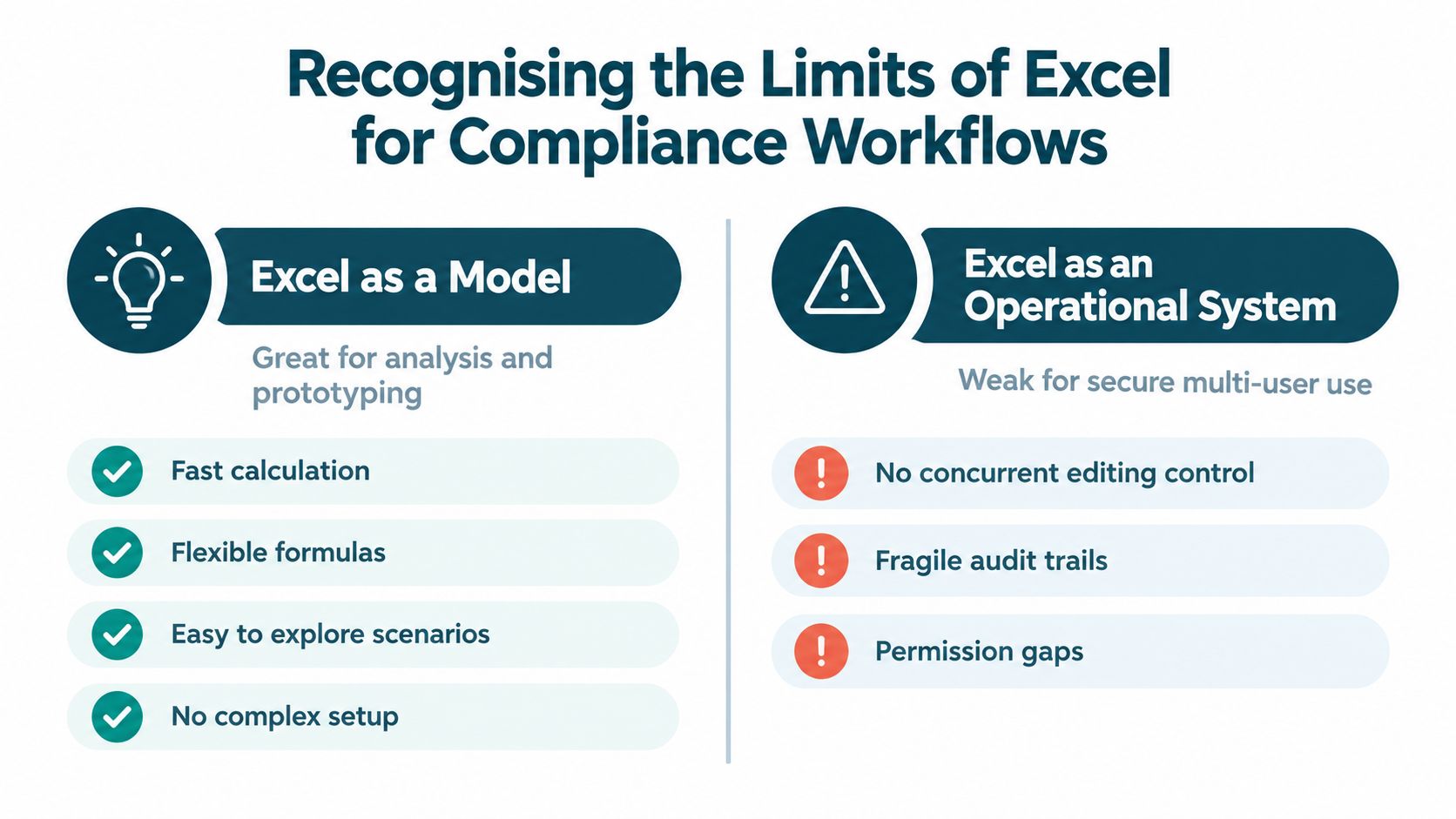
The distinction is useful:
| Excel as an analytical model | Excel as an operational compliance workflow |
|---|---|
| Fast calculations and flexible formulas | Manual reminders and follow-up |
| Easy experimentation with fields and views | Weak control over simultaneous edits |
| Familiar to operational teams | Version sprawl across files and folders |
| Useful for prototypes and one-off analysis | Fragile history when users overwrite cells |
| Simple exports and ad hoc reporting | Permission gaps between owners, reviewers and administrators |
The risk isn't just file size
A small workbook can still be critical. The question isn't whether there is one user or a few hundred rows. The question is whether the workbook controls decisions, deadlines or evidence that the business must later defend.
A review of spreadsheet-error research reports the commonly cited estimate that 94% of spreadsheets contain errors, with an average cell error rate of 5.2%. The same review links spreadsheet errors to poor decisions and costs of millions of dollars. It also reports that an audit of the 30 most financially significant spreadsheets at an Australian consulting firm found material errors in 100% of the spreadsheets examined, and cites a construction-company loss of $254,000 linked to an incorrect spreadsheet. These findings are discussed in the review of spreadsheet-error research.
Those figures don't mean every compliance workbook is defective. They do show why formula checks, independent review, version control, change logs, backups and business-impact fields deserve explicit ownership. A register that calculates renewal dates or feeds regulatory reporting needs more scrutiny than a temporary analysis sheet.
Identify the operational breaking point
Excel becomes a liability when manual coordination creates a material chance of missed action or unreliable evidence. Common signs include:
- Concurrent access: Several departments need to update different records at the same time, but the workbook doesn't provide clear edit ownership.
- Automated escalation: Owners need reminders, overdue notifications or escalation to a manager without someone monitoring the file.
- Approval separation: The person completing a control must not be the only person who can approve it.
- Evidence volume: Each obligation needs several documents, review comments, versions and sign-offs.
- Renewal dependency: One missed date can cause a contract, certificate, licence or control review to lapse.
- Complex reporting: Leadership needs current views by owner, jurisdiction, status, risk or review cycle without manual consolidation.
- Change history: The organisation must prove what changed, who changed it and why, even after the active row has moved on.
The answer isn't to keep adding tabs, macros and manual instructions indefinitely. Excel remains appropriate for analytical work and controlled prototypes, but a repeatable operational workflow needs stronger access control, event history and task management than a fragile file can comfortably provide.
Upgrading to a Managed Compliance Web Application
A managed web application becomes a fair consideration when the register has become a daily operating process rather than an analytical workbook. The trigger is usually a combination of ownership gaps, renewal reminders, evidence handling, approvals, access rules and audit preparation effort.
A purpose-built application can give each person an individual login, show task-specific screens, restrict what users can see or change, validate inputs and capture workflow events as they occur. It can also connect an obligation to its evidence, approval, review date and escalation path without asking users to move through a dense grid of tabs and formulas.
The important distinction is managed custom delivery. A compliance team shouldn't have to become a software developer, maintain a DIY no-code build or own an unsupported technical project. A managed service maps the existing workbook, users, calculations, handoffs and edge cases, then delivers a scoped application and supports its operation after launch.
Decide whether the threshold has been reached
Ask these questions about the current compliance register:
- Can a new owner understand every open obligation without a handover meeting?
- Can an approver see the evidence and decision history without searching email?
- Can the compliance lead identify overdue renewals immediately?
- Can the business preserve prior versions when a regulation changes?
- Can an administrator remove access without disrupting the record?
- Can the team explain the register's calculations and controls to an auditor?
- Can the process continue reliably when the workbook's original creator is unavailable?
If several answers are no, improving formatting won't address the underlying operating problem. A managed application can replace cell-level navigation with guided forms, validated fields, role-based permissions, approvals, alerts, dashboards and controlled document generation. The original workbook can remain as a reference and migration backup while the new process is tested and adopted.
A Free Fit Check is a sensible first step when you aren't sure whether the problem warrants a managed upgrade. Use Start a Free Fit Check to describe the workbook, the users, the recurring compliance tasks and the points where ownership, evidence or renewals currently fail. It should help clarify whether Excel needs better governance, a scoped replacement or a more structured workflow.
Spreadsheet Upgrade assesses business-critical Excel workbooks and turns suitable compliance processes into fully managed custom web applications with controlled access, workflow screens and ongoing support. If your register is becoming difficult to audit, maintain or hand over, visit Spreadsheet Upgrade to discuss the current workbook and choose a practical next step.