Month-end is waiting on a dispatch figure. Operations has one total, finance has another, and someone is opening files in a shared folder to work out which version fed the report. Both teams can explain their workbook. Neither can yet defend the combined number.
To reconcile operational data across spreadsheets, you need more than a comparison formula. You need an agreed definition of the figure, rules for resolving disagreement, and evidence that connects the released total to its source records. Excel remains excellent for investigating differences. The harder decision is whether it should also run the operational process that approves the answer.
Why Independent Spreadsheets Give Different Totals
Say operations reports 412 dispatched orders and finance reports 398. Both workbooks look sound. The difference might be genuine, such as dispatches not yet invoiced, or several small spreadsheet mechanics acting together.
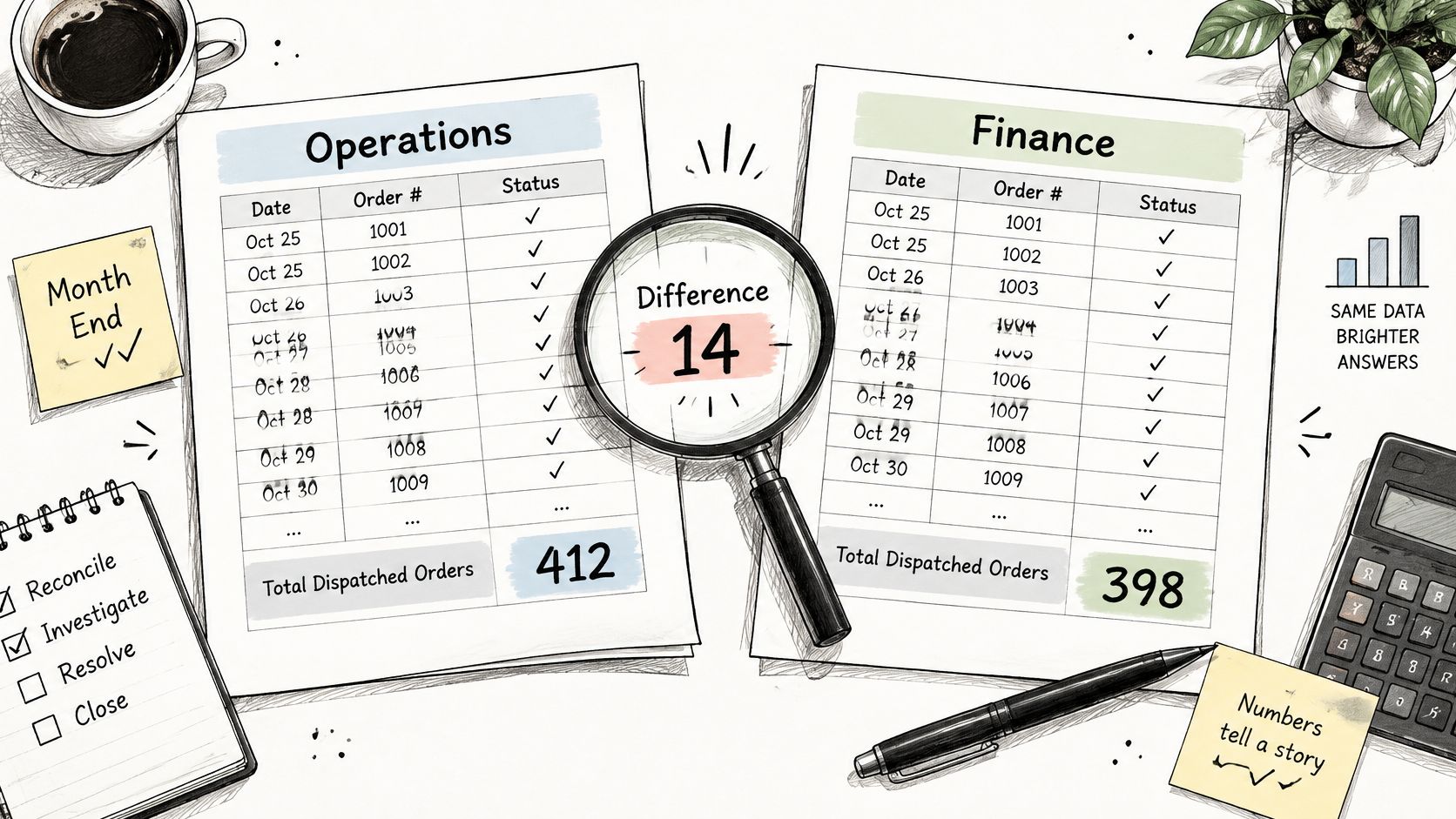
Check the mechanics before treating either total as authoritative:
- Repeated keys: A lookup returns the first matching order, overlooking another line with the same reference.
- Different data types: An identifier stored as text doesn't match its numeric equivalent.
- Inconsistent text: Trailing spaces and different status codes separate records that should agree.
- Ambiguous dates: Text dates are interpreted differently or fall outside the intended reporting period.
- External workbook links: Closed files can leave cached values in place, while moving or renaming files can break references.
- Hidden rows: A total may include filtered or hidden records when the reviewer expects only visible entries.
- Rounding: Displayed amounts agree while stored values differ, or rounded line items don't equal a rounded aggregate.
An audit of operational spreadsheets examined 50 workbooks and found errors in approximately 0.9% to 1.8% of formula cells; applying that range illustratively to 10,000 formula cells gives approximately 90 to 180 erroneous formulas, not a prediction for any particular workbook.
Agreement isn't proof
Two clocks on an office wall can show the same time because someone set both incorrectly. Equally, files can disagree because they were updated at different times, without either calculation being wrong.
Matching spreadsheet totals therefore don't establish accuracy. Both files might use the same incomplete export or flawed calculation, which helps explain why conflicting numbers in management meetings rarely disappear through presentation changes alone.
First diagnostic question: Which mechanic explains the gap, and what evidence would confirm it?
There are wider warning signs too. When people check shelves before trusting the workbook, the same item appears under several names, or reorder lists are built manually, the spreadsheet is probably acting as an operational system rather than merely analysing information.
Decide Which Figure Wins Before You Match
A trusted operational figure starts with authority, not formula choice. Finance may own invoice values while the warehouse owns dispatch quantities. Making the finance workbook win every disagreement would confuse reporting responsibility with ownership of the underlying event.
Agree these preparation decisions with the people responsible for the sources:
- List every source workbook, its owner, refresh frequency and downstream report. This exposes missing inputs and shows who can explain an unexpected change.
- Name the authoritative system for each data element. Orders, invoices, stock counts and job hours can legitimately have different owners.
- Choose a canonical key for each record. Use an order number issued by the order system rather than a customer name someone typed.
- Record the cut-off and time zone for each source. Otherwise, different reporting windows create apparent errors that are really timing differences.
- Agree which field wins and when a named person must intervene. A documented conflict rule prevents reconciliation from becoming a negotiation at every close.
- Record units, currency and rounding conventions. A quantity in cases mustn't be compared directly with a quantity in individual items.
A canonical key is like a passport number compared with a person's name. Names appear in abbreviated, misspelt and reordered forms. A controlled identifier gives the matching process something more dependable, provided it represents the right level of detail.
Source of truth for common operational data
| Data element | Typical source | Canonical key | Conflict rule |
|---|---|---|---|
| Customer order | Order management export | Order number | Order system wins; spreadsheet flags gaps |
| Dispatch | Warehouse log | Dispatch reference plus item code | Warehouse log wins on quantity and date |
| Supplier invoice | Accounts payable export | Invoice number plus supplier ID | Invoice wins on amount; purchase order difference goes to the buyer |
| Job hours | Timesheet system | Employee ID plus job code | Timesheet wins; manager approves exceptions |
| Stock count | Signed count sheet from site | Location plus item code | Latest signed count wins; movements explain the change |
These are illustrative rules, not permission to overwrite conflicting evidence. An invoice can establish the amount billed without establishing that the charge should be approved. Likewise, a signed stock count needs a defined count time so subsequent movements can explain the current balance.
Check the record grain as well. An order-level export and a dispatch-line export won't reconcile row for row when an order ships in parts. Define whether the signed-off figure counts orders, dispatch events, lines or units before anyone starts matching.
A field without an owner will reveal disagreement. It won't resolve it.
Matching and Cleaning Techniques Compared
Match on the strongest key first, then loosen the rules only for records that remain unresolved. Starting with names or approximate amounts makes it easier to create convincing but incorrect matches.
The technique matters, but so does its failure behaviour. A visible error is often safer than a formula that quietly substitutes a blank or zero.
Matching techniques and their failure points
| Technique | Best for | Main risk |
|---|---|---|
| Exact lookup (INDEX-MATCH or XLOOKUP) | Stable codes such as order or invoice numbers | Silent not-found results and first-match on duplicate keys |
| Power Query merge | Large or repeated monthly loads from the same export layout | Wrong join type, and breakage when an export changes column names |
| Fuzzy matching | Customer or supplier names and free-text descriptions | False matches between similar names, so every suggestion needs review |
| Deduplication on a key | Exports that repeat the same record | Removes genuine repeats, such as two identical deliveries on one day |
| Tolerance matching | Amounts affected by rounding, currency or cut-off timing | A wide tolerance hides real gaps, so the limit must be set and recorded |
| External links to closed workbooks in a shared folder | Pulling a figure from another independent source file | Stale values from an old version, or broken links when a file is renamed or moved |
Catch the failures that look successful
XLOOKUP and INDEX-MATCH are useful for investigation, but a successful lookup doesn't prove a unique match. Check key uniqueness separately, and don't turn every not-found result into zero. Zero is a value; missing evidence is a different condition.
Power Query makes repeated imports and merges more manageable. However, an inner join can discard unmatched rows, while duplicate join keys can multiply rows and inflate totals. Review source counts, unmatched populations and output counts, not just whether the refresh completed.
Folder-based lookups are particularly fragile because the reporting workbook depends on files it doesn't control. Someone can replace an export under the same filename without changing the report's visible structure. The displayed total may look familiar even though its supporting evidence has changed.
For an initial investigation, our Excel file comparison tool can help identify differences. Detecting changes still leaves the business decision about which values to accept.
Validate before comparing
Microsoft's Excel data-validation guidance describes restricting permitted values and data types to keep shared workbook entries accurate and consistent. Apply that principle to dates, currencies, status codes, identifiers and required numeric ranges before matching.
Keep original values alongside standardised versions. Removing spaces may be appropriate; stripping leading zeros from an identifier may not be. Deduplication should remove proven repeated records, not genuine events that happen to look alike.
The accompanying video provides additional context for spreadsheet comparison work.
Validation makes the exception list more meaningful. It doesn't prove that records describe the same transaction.
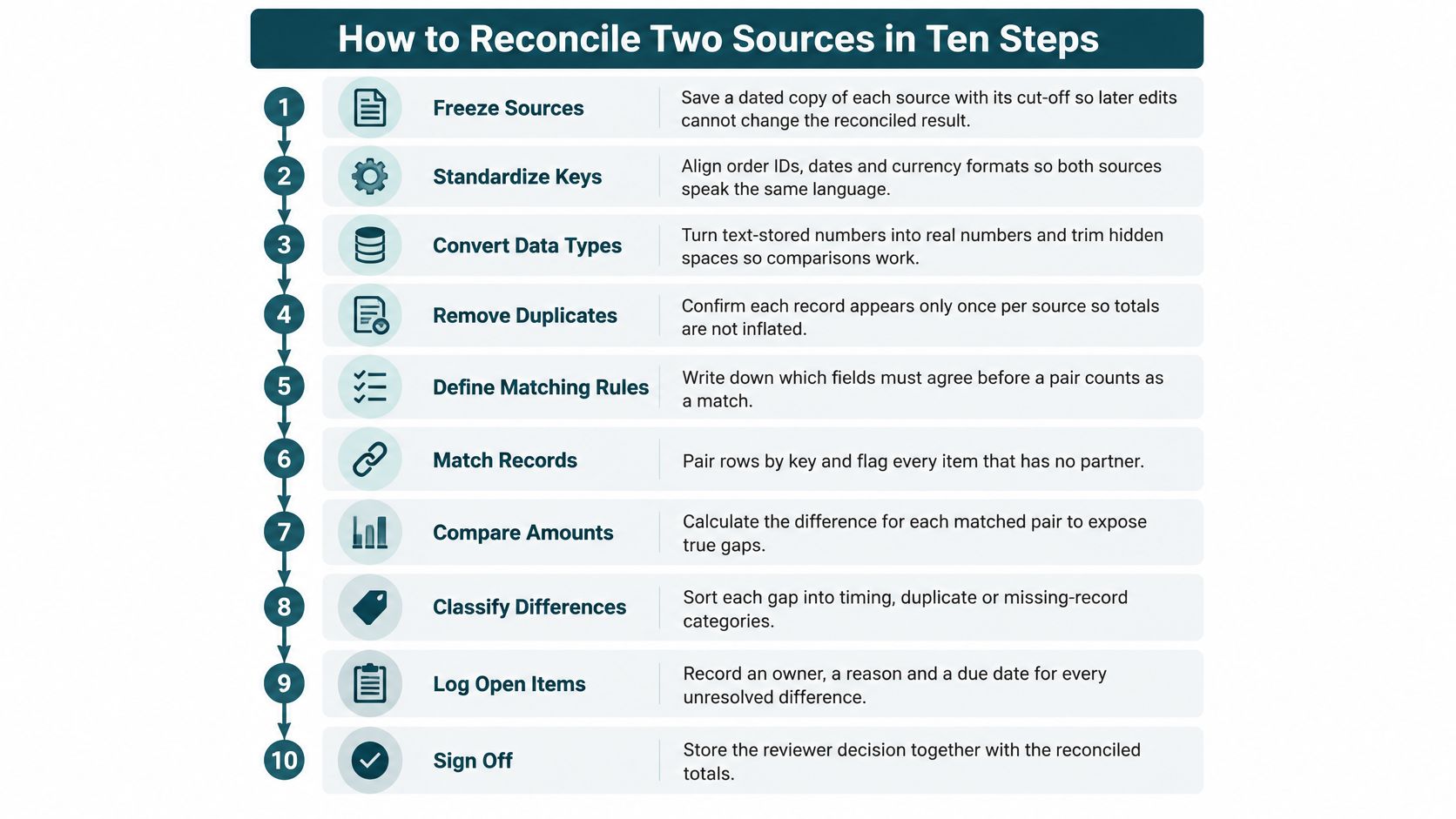
How to Reconcile Two Sources in Ten Steps
Treat reconciliation as a controlled operating procedure, not an invitation to add more formulas. The UK Government Data Quality Framework recommends explicit quality rules, baseline checks, root-cause investigation and corrections as close to the source as possible.
The controlled reconciliation sequence
- Freeze each source as received and retain a dated copy with its cut-off. Later edits mustn't change the evidence supporting a released figure.
- Run required-field, data-type and date-range checks, returning invalid rows to their owner. Rejecting unusable inputs prevents a matching problem from hiding a source-quality problem.
- Standardise keys, codes, units and currency using agreed mapping lists. Preserve the original values so a reviewer can explain each transformation.
- Remove confirmed exact duplicates on the canonical key and log what was removed. Where repetition represents a genuine event, retain it and correct the key definition instead.
- Match exactly on the canonical key and count matched records. Compare the relevant quantities and values as well, because identifying the same record doesn't establish agreement.
- Apply tolerance matching only where the documented limit allows it. Record the actual difference and rule used so an accepted discrepancy remains visible.
- Run fuzzy matching only on the unmatched residue, with a reviewer confirming each suggestion. Similar names aren't sufficient evidence to accept a transaction automatically.
- Assign each record one status from the table below. Consistent classifications make it possible to distinguish unresolved work from accepted results.
- Route exceptions to the named owner with the date raised. Add a reason and due date so unresolved differences don't disappear into email.
- Record the reviewer, sign-off decision and output total in a reconciliation log. Preserve source references and the rule version so the decision can be reconstructed later.
Reconciliation statuses and who acts on each
| Status | Meaning | Who acts |
|---|---|---|
| Matched | Keys and values agree | No action; counted in the total |
| Matched with tolerance | Difference sits inside the documented limit | No action; logged with the limit used |
| Unmatched in source A | Record exists only in the first source | Owner of source A confirms or corrects |
| Unmatched in source B | Record exists only in the second source | Owner of source B confirms or corrects |
| Duplicate | Same canonical key appears more than once | Data owner fixes the source or the key rule |
| Invalid | Fails a required-field, type or date check | Source owner corrects before matching |
The status labels turn a comparison into a work queue. Routine accepted matches can proceed without individual handling; people review exceptions that need evidence or judgement. Make the unmatched labels explicit in the system, because teams sometimes interpret “unmatched in A” as “missing from A” rather than “present only in A”.
A reconciled figure needs a release decision, not merely an empty-looking differences column.
Use the accepted matched population for the report. If an authorised adjustment is necessary, show it separately with its explanation and approval rather than changing a source value to force agreement.
The process visual brings the control activities together.
For a late correction, retain the earlier released result and issue a clearly identified replacement. Overwriting the original removes the evidence needed to explain why yesterday's figure differs from today's.
Audit Trails and Control Costs in Excel
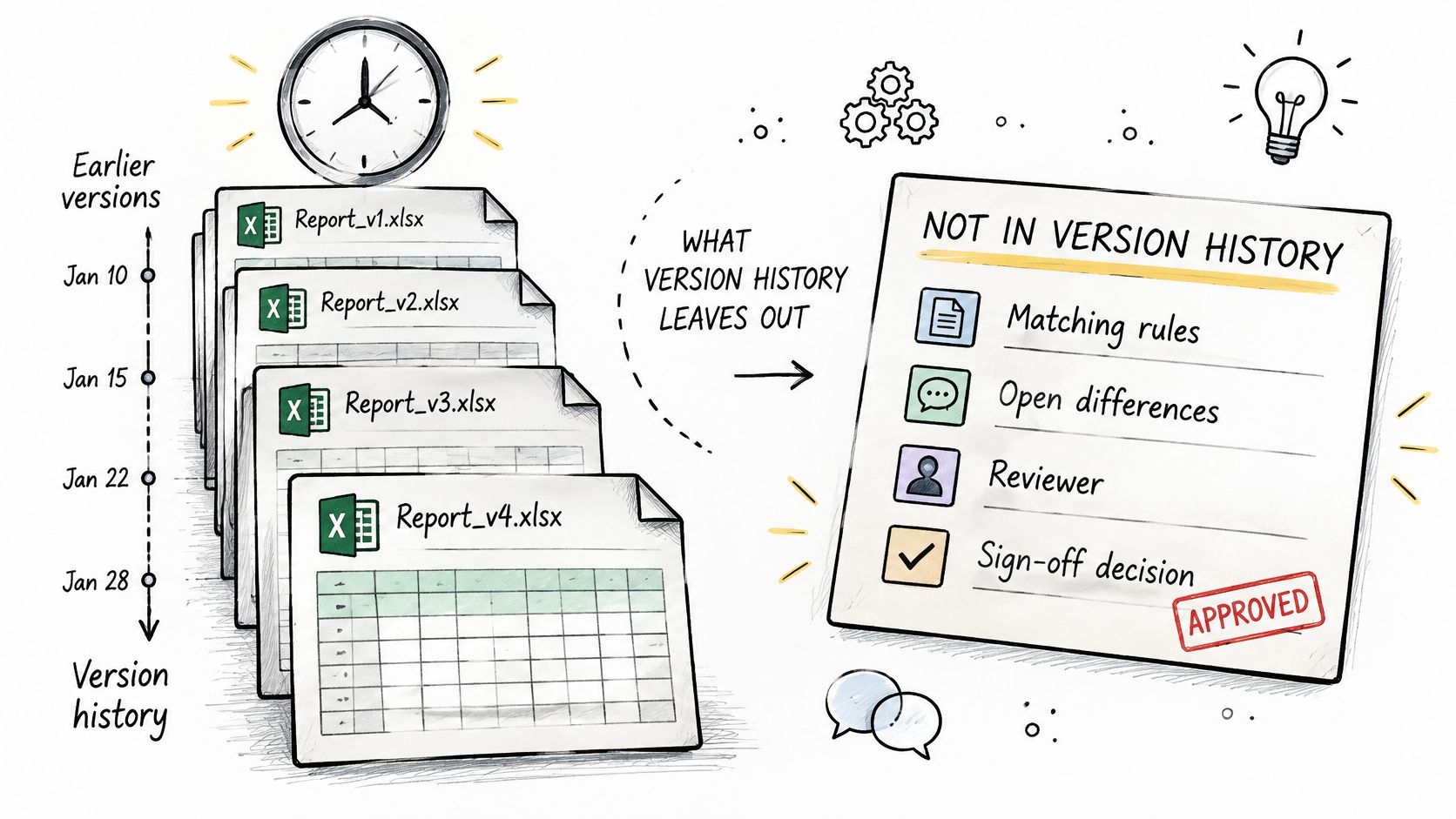
Version history isn't a complete reconciliation audit trail. Microsoft's co-authoring and Version History guidance explains how earlier workbook states can be opened and restored. That supports recovery, but doesn't itself record which matching rules were applied or why a reviewer accepted a difference.
A separate reconciliation log needs source versions, cut-offs, import timestamps, transformation and matching rules, unresolved items, adjustments, reviewer identity and the release decision. Our guide to an Excel audit trail explores the distinction between retaining a file and retaining evidence of a business decision.
Count the administration around the calculation
The workload isn't confined to matching rows. Someone finds the correct export, chases an explanation, reruns the comparison after a late amendment and explains the same figure separately to finance and operations.
Third-party manufacturing research published by Apyrn in 2025 reports that organisations with four or more source systems spend a median 8 to 15 hours each week reconciling product, vendor and inventory data before making decisions. In a different sector, the 2025 Kani Payments survey found that 56% of surveyed UK payments businesses relied partly or entirely on spreadsheets for reconciliation and reporting.
Those findings don't establish your business's cost. Measure your own handling time, including investigation and rework, rather than counting only refresh time.
Apply controls according to risk
Separate routine matches from exceptions that could affect payments, purchasing or released operational commitments. Require two-person approval where a business-defined materiality threshold is exceeded, with the reviewer separate from the person making the adjustment.
Track these measures each cycle:
- Late items: Inputs or decisions received after the agreed cut-off.
- Unexplained adjustments: Entries used to bridge a gap without supporting evidence.
- Repeat exceptions: Differences that return because nobody corrected the source.
- Exception ageing and time-to-resolution: How long items remain open and how quickly owners resolve them.
Improving the workbook first can help where inconsistent structure is the main problem. Controlled lists, clearer ownership fields, protected calculations, consistent naming and a single shared location can make an interim process more defensible. Keep version retention and rollback arrangements in place during any transition.
When a Standard Product or Custom App Is Stronger
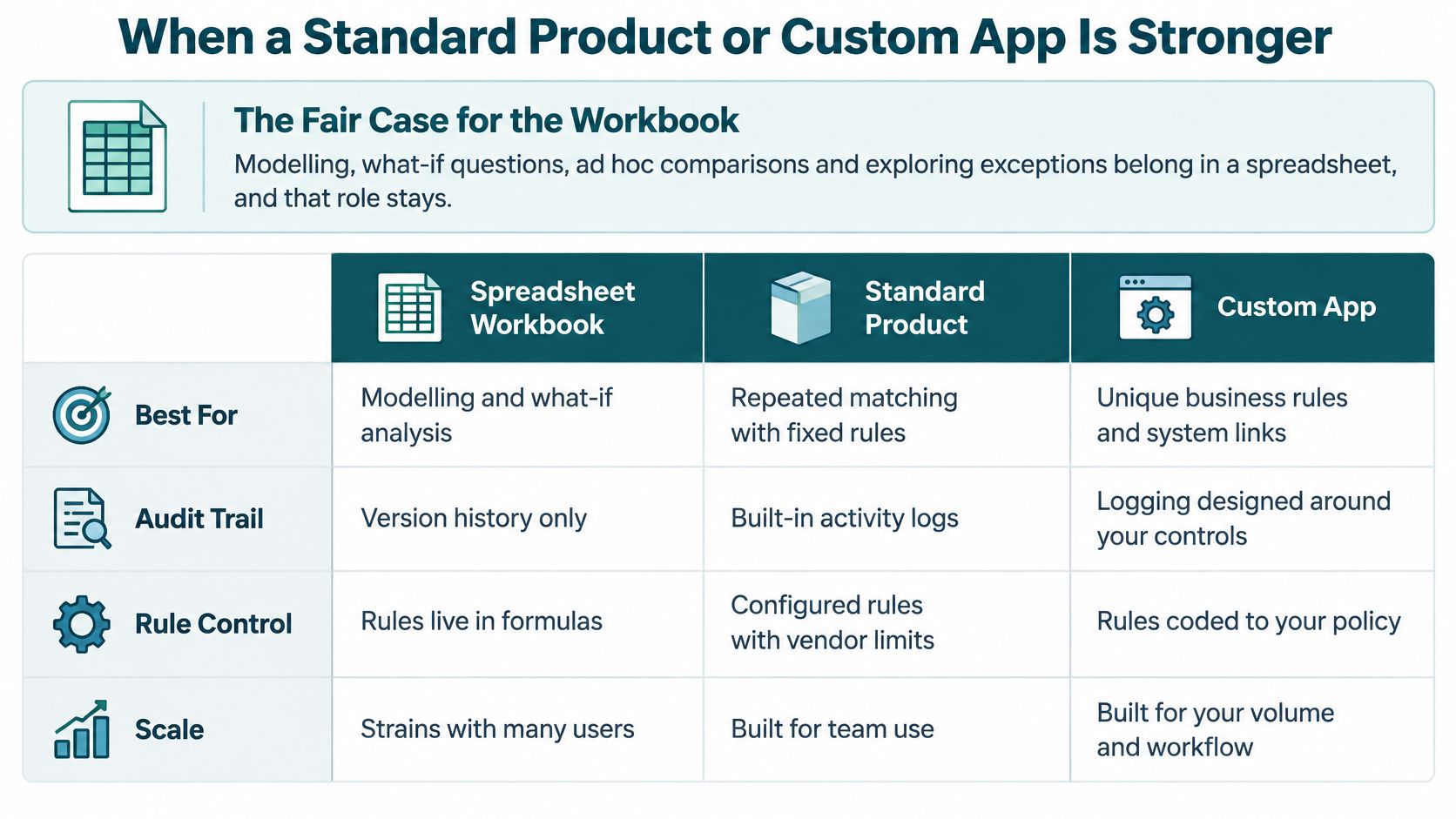
Analytical work belongs in Excel: modelling, what-if questions, ad hoc comparisons and exploring exceptions. Application exports can continue feeding that work after the operational process moves elsewhere.
Excel can also work well for a small, stable catalogue with one storage location, low movement volume and one responsible owner. Those conditions aren't a blanket justification, though. Shared sources, reliance by people who didn't build the workbook and evidenced approval before release create control requirements regardless of file size.
Which route fits which reconciliation situation
| Situation | Keep the workbook | Standard product | Managed custom web app |
|---|---|---|---|
| Ad hoc analysis, modelling and what-if questions | Strong fit | Rarely needed | Not needed; export data to the analysis file |
| Recurring match where a wrong figure is cheap to catch | Acceptable while documented controls hold | Only if a product already matches the rules | Justified when errors carry material consequences |
| Several teams, shared sources, a monthly figure others rely on | Strained by version control and manual checks | Fits if its workflow closely matches yours | Strong fit when rules, roles and exception routing are specific |
| Rules that differ by customer, site or supplier | Fragile, with rules hidden in formulas | Often needs workarounds | Strong fit, with rules built into the application |
| Approval needed before a figure is released | Weak audit trail | Fits if approval is native to the product | Strong fit with role-based permissions and retained evidence |
A standard product is a fair choice when source formats, matching rules and approvals fit through configuration rather than workarounds. Test those controls rather than assuming every product includes them.
A managed custom web application is stronger when rules differ by customer, site or supplier, roles need separate views, and exceptions require specific routing. The wider decision to replace an Excel process should follow those requirements, not a dislike of spreadsheets.
The visual summarises the broad choices; assess actual logging and approval capabilities individually.
Start a Free Fit Check Before the Next Cycle
Start a Free Fit Check to test whether your reconciliation process suits a managed custom web application, existing software or a tighter workbook. Start with the figure you need to defend, not a specification for replacing every spreadsheet.
The Spreadsheet Assessment is designed to identify whether the workbook fills a business-specific gap that deserves its own app. Its recommendation can be to keep Excel or use existing software where that's the better route.
Bring the evidence behind the disputed figure
You don't need to tidy away every awkward case before examining the process. The unresolved differences often reveal the most important requirements.
Bring:
- Sources and owners: Which workbooks contribute, who maintains them and who can authorise corrections.
- Cut-off timing: The reporting window and refresh timing for each input.
- Canonical keys: The identifiers used to connect records, including any known repeated keys.
- The signed-off figure: The precise measure the Finance Director or Operations Director approves.
- Recent exceptions: Differences from the last three cycles, their explanations and the time each took to resolve.
Include a difficult exception as well as a clean match. A straightforward record shows the routine path; a disputed quantity, late dispatch or supplier adjustment shows where permissions, evidence and judgement matter.
The useful question isn't whether an app can reproduce the total. It's whether the process can explain and authorise that total reliably.
Resolve transition questions before agreeing a build
A later assessment works through migration details before a build is agreed. These include supplier and coding references, which historical data to move, approval exceptions and the cut-over point.
We agree on calculations, access, wording, and workflow before building. That prevents a replacement from merely reproducing hidden spreadsheet assumptions behind a browser screen.
Keep the immediate objective narrow: establish which sources support the operational figure, who resolves disagreement and what evidence permits release. Current details of plans and assessments are available on the pricing page, without relying on a fixed amount in an evergreen article.
Spreadsheet Upgrade offers fully managed custom web applications for business-critical spreadsheet workflows, including processes where independent sources must support one defensible operational figure. Visit Spreadsheet Upgrade to start with a Free Fit Check and establish whether your reconciliation needs a stronger workbook, existing software or a purpose-built application.